How to Choose a Gaming Laptop That Actually Performs
Discover the essential criteria for choosing the perfect gaming laptop. Components, performance, and top models explained.
Buying a gaming laptop isn't like picking up a regular notebook. The difference between nailing your purchase and regretting it comes down to technical details that most people overlook.
You've probably experienced the frustration of seeing your favorite game stuttering, sluggish graphics, or temperatures that could fry an egg. This happens when components weren't chosen with real performance in mind.
But here's the good news: understanding what actually matters is easier than it seems. In this complete guide, you'll discover exactly which specs to prioritize, how to compare models, and how to avoid common traps that'll cost you big time.
From choosing the ideal graphics card to understanding why cooling systems matter so much, I'll show you everything I learned from analyzing dozens of models available. Get ready to make a smart purchase and enjoy your games without limitations.




Table of Contents
- Why Invest in a Dedicated Gaming Laptop
- Graphics Card: Your Most Critical Component
- Processor: Intel or AMD for Gaming
- RAM and Storage: How Much You Really Need
- Display and Refresh Rate for Better Gameplay
- Cooling System: Prevent Overheating
- Common Mistakes That Cost You Money
- Frequently Asked Questions
- Conclusion
Why Invest in a Dedicated Gaming Laptop
Lots of folks think any laptop can run games if it has "decent specs." Reality check: gaming laptops are engineered from the ground up to handle intense graphics processing and heat loads.
A regular laptop with an i5 processor and 8GB of RAM might launch lightweight games like League of Legends or Valorant, but it'll choke during critical moments. That's because integrated GPUs can't handle intense graphics processing.
What Makes a Gaming Laptop Different
Gaming laptops aren't just souped-up versions of regular models. They have specific architecture to tackle three simultaneous challenges: heavy graphics processing, elevated temperatures, and power consumption.
Dedicated graphics card: While regular laptops use integrated GPUs built into the processor with limited performance, gaming models have a separate graphics card with its own memory. This represents a 300% to 500% difference in graphics performance.
Specialized cooling: Systems with multiple fans, heat pipes, and larger heatsinks keep temperatures controlled even during 4 to 6-hour gaming sessions. Regular laptops overheat after 30 minutes of heavy gaming.
Power and battery: More powerful power supplies support the high consumption of dedicated GPUs. Battery life is shorter than regular laptops, but that's offset by the performance gains.
Optimized screens: Refresh rates of 120Hz, 144Hz, or even 240Hz guarantee smooth visuals. Regular laptops are stuck at 60Hz, causing micro-stutters in fast-paced games. Learn more about refresh rates in our guide on gaming monitors.
Benefits Beyond Gaming
A gaming laptop investment serves way more purposes than entertainment. The beefy hardware accelerates professional tasks that would take regular laptops hours to process.
Video and photo editing: Programs like Adobe Premiere, After Effects, and Photoshop benefit directly from dedicated GPUs. Renders that take 2 hours on regular laptops drop to 20-30 minutes.
3D modeling and CAD: Architecture, engineering, and industrial design software run without hitches. The dedicated graphics card processes millions of polygons in real-time.
Programming and development: Code compilation, virtualization, and emulators run simultaneously without performance loss. Perfect for game and heavy app developers.
Streaming and content creation: Ability to record gameplay, edit, and upload while maintaining maximum quality. The GPU handles graphics while the CPU processes recording. If you're considering a MacBook for work, gaming laptops offer similar power for creative tasks.
Graphics Card: Your Most Critical Component
The graphics card is the heart of any gaming laptop. It determines which games you can run, at what graphics quality, and how many frames per second you'll get.
Lots of people focus only on the processor and RAM, but that's a mistake. An awesome CPU with a weak GPU will still stutter in games. On the flip side, a powerful GPU can compensate for even a mid-range processor.
Understanding NVIDIA GeForce RTX Series
NVIDIA dominates the gaming laptop market with its RTX series cards. Each generation and model serves a different player profile and budget.
RTX 2050 and 3050: Entry into gaming — Perfect for beginners or those playing lightweight competitive titles like Valorant, CS2, Fortnite, and League of Legends. Run heavy games on medium quality at 60 FPS in Full HD. Affordable pricing makes these GPUs popular in laptops from $800 to $1,200.
RTX 4050 and 4060: The sweet spot — The smartest choice for most gamers. Run modern AAA games on high quality at 80-100 FPS in Full HD. Support Ray Tracing and DLSS 3, technologies that improve graphics and performance. Found in laptops from $1,200 to $1,800. Check out our laptop recommendations for more options.
RTX 4070 and higher: Maximum performance — For those who accept no compromises. Run any current game on ultra quality at 120+ FPS. Perfect for 2K and even 4K resolution. The investment is steep, but ensures the laptop stays relevant for 5 to 6 years. Models starting at $1,800. For more on graphics cards, see our best graphics cards guide.
AMD Radeon: The Competitive Alternative
Though less common in laptops, AMD offers competitive options with proprietary technology equivalent to NVIDIA's DLSS.
RX 7600M XT and RX 7700M: Performance similar to NVIDIA's RTX 4050 and 4060, usually at a slightly lower price. FSR technology improves performance without losing visual quality. Great choice for those working with editing and design, where AMD GPUs have advantages in some software. Learn about GPU technology in our detailed article.
How Much VRAM Do You Actually Need
The graphics card's VRAM determines how much graphics data it processes simultaneously. Modern games are increasingly demanding in this aspect.
4GB VRAM: Only sufficient for lightweight games or titles from a few years ago on medium quality. Not recommended for purchases as it severely limits your options.
6GB VRAM: The bare minimum acceptable for current games. Supports most titles in Full HD with high quality, but may stutter in games with ultra textures or many on-screen elements.
8GB VRAM or more: Recommended for long-term investment. Ensures headroom for future games and allows ultra quality without worries. Essential for those gaming at 2K resolutions or working with rendering.

Processor: Intel or AMD for Gaming
After the graphics card, the processor is your second most important component. It manages everything happening in the game beyond graphics: NPC artificial intelligence, object physics, position calculations, and server communication.
The choice between Intel and AMD isn't about which is "better," but rather which best suits your usage type. Both offer excellent processors, each with its own advantages.
Intel Core: Dominance in Competitive Gaming
Intel processors stand out for their high per-core frequency, which directly benefits games that depend on pure processing speed.
Intel Core i5 (12th to 14th gen): Offers 6 to 10 cores with frequencies reaching 4.5 GHz in Turbo mode. Enough to run any current game without bottlenecks when paired with GPUs up to RTX 4060. Great bang for your buck for intermediate gamers.
Intel Core i7 (12th to 14th gen): Adds more cores and cache, improving multitasking like gaming while streaming or recording gameplay. Frequencies reach 5.0 GHz. Perfect pairing with RTX 4060 to 4070. For processor basics, check our CPU explainer.
Intel Core i9 (12th to 14th gen): Top-of-the-line for enthusiasts. With 14 to 24 cores and frequencies up to 5.8 GHz, delivers maximum performance even in the most demanding games. Recommended only for those with RTX 4070 or higher GPUs who want zero compromises.
AMD Ryzen: Efficiency and Multitasking
AMD Ryzen processors balance more cores with competitive frequencies, plus consume less power than Intel equivalents.
AMD Ryzen 5 (5000 and 7000 series): Offers 6 to 8 cores with Zen 3 or Zen 4 architecture. Performance similar to Intel Core i5, but with better power efficiency. Perfect for laptops where battery life matters.
AMD Ryzen 7 (5000 and 7000 series): Balances gaming and productivity with 8 cores and 16 threads. Frequencies reach 4.9 GHz. Excellent for those working with editing and rendering beyond gaming.
AMD Ryzen 9 (5000 and 7000 series): Up to 16 cores for extreme performance in any scenario. Clear advantage in applications using many threads simultaneously, like game engines during development.
Processor Generation Matters More Than the Name
A common mistake is comparing only the family number (i5, i7, Ryzen 5, Ryzen 7). The processor generation makes a huge difference in actual performance.
Intel generations: A 13th or 14th gen Core i5 can be faster than a 10th or 11th gen Core i7. The Alder Lake and Raptor Lake architectures brought 30% to 40% performance improvements.
AMD generations: Ryzen 5000 series (Zen 3) already offers solid performance. 7000 series (Zen 4) adds DDR5 support and better efficiency. Avoid Ryzen 3000 or earlier models, which are outdated for modern games.
Rule of thumb: Always prefer the latest generation within your budget. A current lower-tier processor usually beats an older high-tier one in games.
RAM and Storage: How Much You Really Need
These two components work together to ensure your laptop responds quickly to commands. Insufficient RAM causes stuttering, while slow storage makes you waste time on loading screens.
The good news is these are the easiest components to upgrade later if needed. But it's better to buy the laptop with adequate specs from the start.
RAM Memory: 16GB is the Minimum
RAM temporarily stores all data currently in use. Modern games consume increasingly more memory for high-resolution textures, advanced physics, and massive open worlds.
8GB RAM: Technically works for lightweight games, but you'll have problems. Modern AAA games slow down, especially if you have anything else open. Skip laptops with this config for gaming. Looking for smartphones with good RAM? Same principle applies.
16GB RAM: Current standard and recommended minimum. Enough to run any game released so far on high quality without stuttering. Allows Discord, Chrome, and Spotify open in the background without issues.
32GB RAM: Only worth the extra investment if you stream, edit videos, or work with heavy software beyond gaming. For pure gaming, the difference is minimal compared to 16GB.
DDR4 vs DDR5: DDR5 modules are faster and more efficient, but also pricier. For games, the practical difference between DDR4 3200MHz and DDR5 4800MHz is small in most cases. DDR4 still offers better value. Learn about RAM technology in detail.
NVMe SSD: Speed That Makes a Difference
Storage defines how long you wait for games to load. The difference between HDD, SATA SSD, and NVMe SSD is massive in daily experience.
Traditional HDDs: Simply don't even consider them. They're slow, noisy, and make any laptop feel ancient. Games take minutes to load what an SSD does in seconds.
256GB SSD: Way too limited. Modern games take 50 to 150GB each. With operating system and basic programs, you'll have space for only 2 or 3 installed games. Only acceptable if the laptop has an extra M.2 slot for expansion.
512GB SSD: The comfortable minimum. Allows installing 5 to 8 games simultaneously, plus system and programs. Good initial choice if you plan to add another SSD later.
1TB SSD or more: Perfect for not worrying about space. Holds a large game library, gameplay recordings, and personal files. Worth the investment if you download many games or work with large files.
NVMe speed: Look for SSDs with read speeds above 3000 MB/s. This guarantees fast loading in both Windows and games. Gen 4 SSDs are even faster, but Gen 3 already works great.
Display and Refresh Rate for Better Gameplay
Your gaming laptop's screen needs to keep up with your reflexes. A powerful GPU is useless if the screen can't show all the frames it processes.
Beyond refresh rate, other factors like panel type, response time, and resolution directly impact your gaming experience.
Refresh Rate: Hz That Actually Matter
Refresh rate measures how many times per second the screen updates the image. The higher, the smoother and more responsive the visual experience.
60Hz: The basic found on regular laptops. Only sufficient for casual and slow single-player games. In competitive games, you're at a disadvantage against opponents with better screens.
120Hz: Significant improvement over 60Hz. The difference is immediately visible in any game. Good option for tight budgets still wanting a superior experience.
144Hz: The recommended standard for gaming laptops. Offers excellent smoothness in competitive games. Most RTX 4050 and higher cards can take advantage of this rate in Full HD. If you want to learn more, check our gaming monitors guide.
165Hz to 240Hz: For competitive players who take gameplay seriously. The difference from 144Hz is smaller, but high-level players notice it. Only worth the investment if your GPU can consistently generate 165+ FPS.
Panel Type: IPS is Essential
Panel type determines color quality, viewing angles, and response time. For gaming, some technologies are clearly superior.
TN panels: Old, cheap, and bad. Washed-out colors, terrible viewing angles. Skip even if the price is tempting. Makes no sense.
IPS panels: Current standard and recommended. Vibrant colors, wide viewing angles, and consistent quality. Adequate response time for games. Look for specs mentioning "IPS" or variations like "WVA" and "AH-IPS."
OLED panels: Starting to appear in premium laptops. Infinite contrast, incredible colors, and perfect blacks. However, they're pricier and have burn-in risk if you leave static images too long. Not essential, but impressive when available.
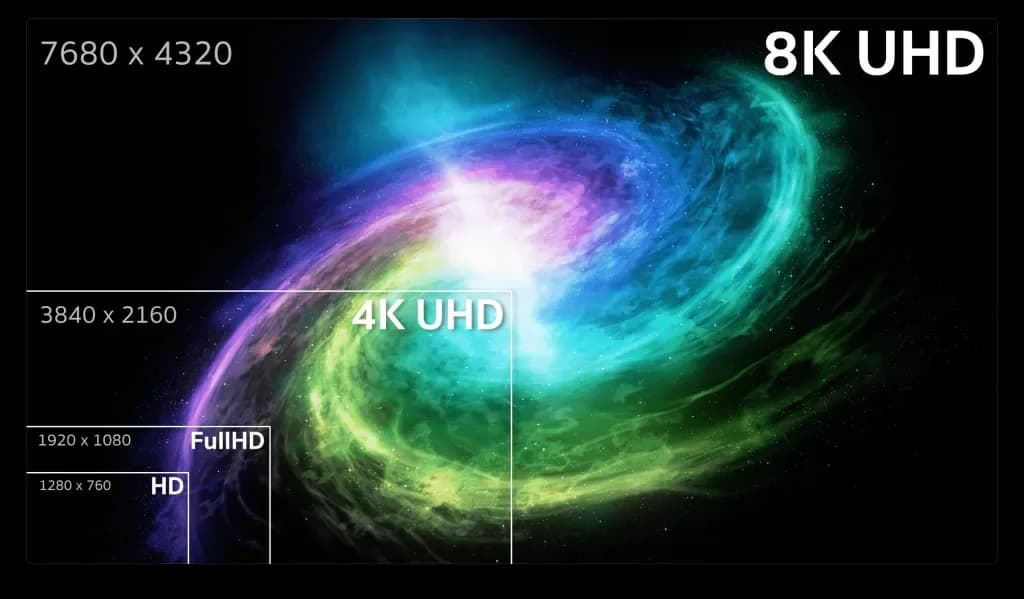
Resolution: Full HD Still Rules
Resolution defines how many pixels your screen has. More pixels mean more detailed images, but also demand way more from the GPU.
Full HD (1920x1080): The smart choice for gaming laptops. Offers sharp images without demanding too much from the GPU. All current graphics cards run games smoothly at this resolution. Allows enjoying high refresh rates.
2K or QHD (2560x1440): Intermediate resolution with more detailed image. Requires powerful GPU like RTX 4060 or higher to maintain high FPS. Only worth it if you prioritize graphics over competitive performance.
4K (3840x2160): Gorgeous, but impractical for most. Requires RTX 4070 or higher and even then you'll need to reduce graphics settings. Better for creative work than gaming.
Screen size: Most gaming laptops come in 15.6 or 17.3 inches. 15.6" models balance portability and immersion. 17.3" ones offer more cinematic experience but are heavy to carry around. For iPad work options, smaller screens might suit you better.

Cooling System: Prevent Overheating
A gaming laptop can have the best components on the market, but if the cooling system sucks, none of that matters. High temperatures force the processor and GPU to slow down to avoid melting.
The result is inconsistent performance, stuttering, and permanent component damage long-term. A good thermal system keeps everything running at max speed.
How Laptop Cooling Works
Unlike desktops, laptops have extremely limited space for air circulation. Engineers need to get creative to dissipate heat generated by CPU and GPU working full throttle.
Heatpipes (heat tubes): Sealed copper tubes with special liquid that transport heat from components to heatsinks. Gaming laptops usually have 2 to 4 heatpipes. More means better dissipation.
Fans: Gaming laptops use 2 or 3 fans to push hot air out. Premium models have larger, quieter fans. Small fans make excessive noise to compensate for size.
Heatsinks: Metal plates with fins that increase surface area contact with air. Larger, thicker heatsinks mean better cooling but make the laptop heavier.
Ventilation grilles: Need adequate space on sides and back. Poorly designed laptops suffocate the thermal system with small or badly positioned grilles.
Cooling Technologies by Brand
Manufacturers developed proprietary systems to differentiate their products. Some technologies actually work, others are just marketing.
ASUS ROG Intelligent Cooling: Smart system that adjusts fan speed as needed. Silent mode for regular use, Turbo for heavy games. Works well in practice.
Acer Nitro Sense: Software allows manual fan speed control and real-time temperature monitoring. Useful for those who like total control.
Lenovo Coldfront: Combines vapor chamber heatsinks and optimized fans. Present in Legion and LOQ models. Above-average thermal performance.
Dell Alienware Cryo-Tech: Advanced system with unique ventilation design. Very efficient, but found only in crazy expensive premium models.
Signs of Inadequate Cooling
Before buying, research technical reviews that measure temperatures. Some signs indicate thermal problems that'll bug you:
Thermal throttling: When temperatures exceed 90-95°C, components automatically slow down. This causes sudden FPS drops mid-game.
Excessive noise: Fans always operating at maximum indicate the system is struggling to maintain safe temperatures. Besides annoying, it reduces fan lifespan.
Hot keyboard: If the keyboard gets uncomfortable to touch after 30 minutes gaming, heat isn't being directed properly to air outlets.
Superheated base: Extremely hot bottom indicates inefficient dissipation. This also damages the battery over time. For more tech insights, see our tech accessories guide.
Common Mistakes That Cost You Money
After analyzing dozens of gaming laptops and talking to many gamers, I noticed certain mistakes repeat constantly. Avoiding these traps can save lots of money and frustration.
Focusing Only on the Processor
Mistake number one is thinking a Core i7 or Ryzen 7 automatically means quality gaming laptop. Top-tier processors are worthless with a weak GPU.
Why this happens: Marketing emphasizes the processor because most buyers know these specs. Salespeople take advantage to push models with expensive CPU but basic GPU.
Reality check: A laptop with Core i5 and RTX 4060 runs games way better than one with Core i9 and RTX 3050. For games, GPU matters more.
How to avoid: Always prioritize the graphics card in your budget. Current mid-range processors are enough for any game when paired with adequate GPU. For understanding laptops for students, same principles apply.
Buying "Gaming" Model with Only 8GB RAM
Manufacturers sell laptops with dedicated GPU but only 8GB RAM to lower the price. Seems like a steal, but you'll regret it fast.
The problem: Modern games alone can use 10 to 12GB RAM on high quality. With Windows and background programs, 8GB gets completely saturated.
Real consequences: Frequent stuttering, slow loading, need to close everything before gaming. You save $75-$125 on purchase, but lose it in frustration.
Smart solution: If the model has only 8GB but allows easy upgrade, buy an extra 8GB or 16GB module. Installation takes 10 minutes.
Ignoring the Cooling System
Many buyers evaluate only CPU and GPU, but completely forget the cooling system — one of the most critical factors in gaming laptops.
Why this is a serious mistake: Unlike desktops, laptops have limited space. If the thermal system is weak, the hardware automatically reduces performance (thermal throttling) to avoid damage.
What happens in practice: Unstable FPS, sudden performance drops after minutes of gaming, and excessive fan noise.
How to avoid:
- Research reviews showing temperature tests
- Prefer models with two fans and multiple heat pipes
- Be suspicious of super-thin laptops with overly powerful hardware
Choosing Low-Quality Screen
Another common mistake is investing heavily in hardware and skimping on the screen.
The problem: Full HD 60Hz screens with low brightness and washed-out colors completely limit the gaming experience — even with a powerful RTX.
Reality check: You might have 150 FPS in-game, but only "see" 60 frames per second.
The ideal:
- Full HD or QHD
- 144Hz or more
- IPS or OLED panel
- At least 300 nits of brightness
Not Thinking About Future Upgrades
Buying a gaming laptop without considering upgrades is a strategic mistake.
The risk: Models with soldered RAM or only one slot limit the equipment's lifespan.
How to avoid:
- Check if there are two RAM slots
- Confirm if there's a free NVMe slot
- Read the technical manual before purchase
Looking for quality gaming keyboards? Same upgrade philosophy applies.
Frequently Asked Questions
What's the difference between a gaming laptop and a regular laptop?
Gaming laptops feature dedicated graphics cards, more powerful processors, robust cooling systems, and displays with higher refresh rates. Regular laptops use integrated GPUs and focus on basic tasks, unable to handle demanding games.
What's the best graphics card for a gaming laptop?
For entry-level, RTX 2050 or 3050 are suitable. For mid-range performance, RTX 4050 or 4060 offer excellent balance. For high performance, RTX 4070 or higher runs any game at maximum quality. The ideal choice depends on your budget and the games you plan to play. Check our graphics cards guide for more.
How much RAM do I need for gaming?
The recommended minimum is 16GB of DDR4 or DDR5 RAM. For heavier games and multitasking, 32GB offers better performance. Avoid models with only 8GB as they significantly limit performance in modern games.
Is a gaming laptop worth it for work?
Yes. Gaming laptops excel at heavy professional tasks like video editing, 3D modeling, and graphic design. The powerful hardware ensures smooth performance in demanding programs. However, they're heavier and have shorter battery life than business laptops. Explore MacBook options for comparison.
What's the best screen refresh rate for gaming?
For competitive games like FPS and MOBAs, 144Hz is the minimum recommended. Screens with 165Hz to 240Hz offer superior smoothness. For casual gaming, 120Hz already provides an excellent experience. The higher the rate, the smoother the gameplay.
Can you upgrade a gaming laptop?
In most models, only RAM memory and SSD storage can be expanded. The processor and graphics card are soldered to the motherboard and cannot be replaced. That's why choosing a model with current components ensures greater longevity.
What's the average lifespan of a gaming laptop?
With proper care, a gaming laptop lasts between 4 to 6 years. The ability to upgrade RAM and SSD helps extend this period. Models with latest-generation components tend to remain relevant longer.
Conclusion
Buying a gaming laptop is a major investment and needs to be done strategically. Don't fall for marketing traps, don't focus only on the processor, and never underestimate the importance of the GPU, RAM, screen, and cooling system.
If you prioritize the right components, avoid the most common mistakes, and choose a balanced model, you'll have a laptop capable of running current and future games for many years — without regrets.
👉 Final tip: always think about the whole package. A good gaming laptop isn't the most expensive one, it's the most balanced for your usage profile.
Want more options? Check out our updated guide with the best budget gaming laptops of 2025 and make a safe choice. Also explore our guides on best phones under $400 and best smartwatches for complete tech setups.
For expanding your setup, consider quality gaming headsets and mechanical keyboards to maximize your gaming experience.