Best Budget Gamer Mechanical Keyboards
Discover the top budget mechanical keyboards for gamers. Expert reviews, comparisons & buying tips included.
Choosing the right mechanical keyboard can completely transform your gaming experience. After testing dozens of models over the years, I can confidently say you don't need to break the bank for professional-quality equipment.
In this comprehensive guide, I've selected the best budget mechanical keyboards based on durability, tactile response, RGB lighting capabilities, and most importantly, affordable pricing. Each model has been carefully evaluated for different gamer profiles and needs.
If you're looking for that definitive upgrade to your gaming setup without compromising your budget, you've come to the right place.
Best Budget Mechanical Keyboards
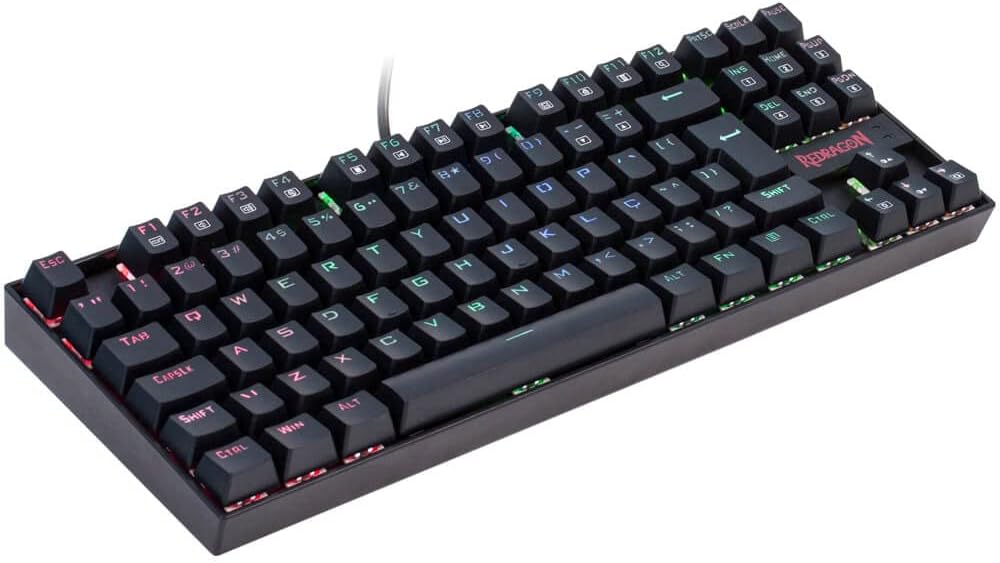

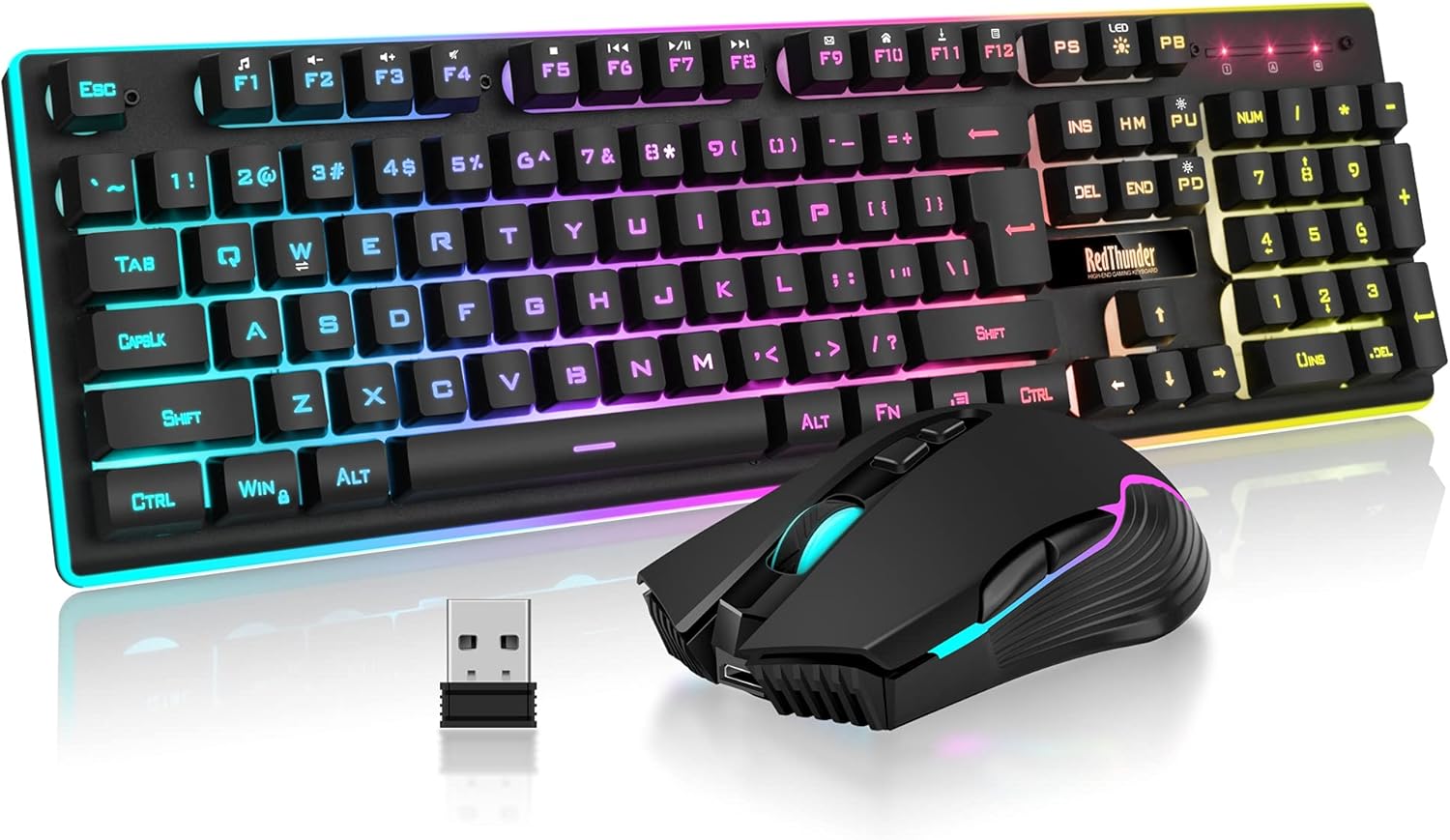


Table of Contents
- Redragon Kumara K552 RGB: Best Overall
- RedThunder K10 Wired Combo
- RedThunder K10 Wireless Combo
- AULA F99 Wireless Keyboard
- RisoPhy Mechanical Gaming Keyboard
- AULA F2088 Typewriter Style
- How to Choose Your Ideal Mechanical Keyboard
- Essential Purchase Tips
- Frequently Asked Questions
- Conclusion
1. Redragon Kumara K552 RGB - Best Overall
The Redragon Kumara K552 RGB represents the evolution of a gaming classic, now featuring fully customizable RGB lighting. This tenkeyless mechanical keyboard has won over thousands of gamers with its perfect combination of build quality and affordable pricing.
Technical Specifications
- Layout: Tenkeyless 87-key design
- Switches: Outemu Blue (tactile with audible click)
- Lighting: Fully customizable RGB SMD with software support
- Anti-Ghosting: N-Key Rollover across all 87 keys
- Connectivity: USB with detachable braided cable
- Construction: Steel reinforced plate with ABS double-shot keycaps
Why It's the Best
The Outemu Blue switches provide excellent tactile feedback with characteristic audible clicks, perfect for both gaming and typing. With a 50-million keystroke lifespan, these switches deliver professional-grade reliability at budget-friendly prices.
The tenkeyless layout eliminates the numeric keypad, creating more desk space for mouse movement - a crucial advantage for FPS gamers. The compact design also makes this keyboard highly portable for LAN parties or tournaments.
DIY-friendly technology allows easy switch removal for maintenance or customization. The steel reinforced plate ensures durability while the double-shot injection keycaps guarantee legends will never fade, even after years of intensive use.
Ideal for: Gamers seeking the best overall value with customizable RGB lighting and authentic mechanical feel without premium pricing.
2. RedThunder K10 Wired Gaming Keyboard Combo
The RedThunder K10 Wired Combo delivers exceptional value by bundling a mechanical keyboard, gaming mouse, and ergonomic wrist rest. This comprehensive package eliminates the need for separate purchases while maintaining quality components throughout.
Technical Specifications
- Layout: Tenkeyless 87-key configuration
- Switches: Huano Red (linear, silent operation)
- Lighting: Rainbow LED with multiple pre-programmed effects
- Anti-Ghosting: 26-key rollover protection
- Connectivity: USB 2.0 with fixed cable
- Construction: ABS housing with double-injection keycaps
- Includes: Gaming mouse and padded wrist rest
Complete Gaming Solution
The Huano Red switches offer linear, silent performance ideal for shared spaces or late-night gaming sessions. These switches maintain excellent durability with a 50-million click lifespan while providing smooth, consistent keystrokes.
The rainbow LED lighting system features multiple dynamic effects controlled directly from the keyboard. No software installation required - simply cycle through lighting modes using intuitive hotkey combinations.
The bundled gaming mouse includes adjustable DPI settings for precise control across different game genres. The ergonomic wrist rest provides crucial support during extended gaming sessions, reducing strain and improving comfort.
Ideal for: Budget-conscious gamers wanting a complete setup with silent linear switches and everything needed to start gaming immediately.
3. RedThunder K10 Wireless Gaming Combo
The RedThunder K10 Wireless Combo offers the freedom of wireless connectivity combined with comprehensive gaming accessories. This bundle includes everything needed for a complete wireless gaming experience without cable clutter.
Technical Specifications
- Layout: Tenkeyless 87-key design
- Switches: Outemu Blue (tactile with audible click)
- Lighting: Dynamic LED with on-the-fly adjustments
- Connectivity: 2.4GHz wireless with USB receiver
- Battery: Rechargeable with extended runtime
- Construction: Durable ABS housing
- Includes: Wireless mouse and wrist rest
Wireless Freedom
The 2.4GHz wireless technology provides lag-free performance indistinguishable from wired connections. The stable connection maintains responsiveness during intense gaming sessions without interference or dropouts.
The rechargeable battery system eliminates the need for constant battery replacements. A single charge provides days of continuous gaming, and the keyboard remains fully functional while charging via USB cable.
Outemu Blue switches deliver satisfying tactile feedback with audible clicks, perfect for gamers who enjoy mechanical keyboard acoustics. The 12 multimedia hotkeys provide convenient control over volume, playback, and system functions.
Ideal for: Gamers seeking wireless convenience with authentic mechanical switches and a complete accessory bundle for clean, cable-free setups.
4. AULA F99 Wireless Mechanical Keyboard
The AULA F99 Wireless Mechanical Keyboard combines premium aesthetics with practical wireless functionality. This keyboard stands out with its modern design language and versatile connectivity options for different gaming environments.
Technical Specifications
- Layout: Compact tenkeyless format
- Switches: Hot-swappable mechanical switches
- Lighting: RGB backlighting with customization
- Connectivity: Wireless 2.4GHz and Bluetooth 5.0
- Battery: Long-lasting rechargeable lithium battery
- Construction: Aluminum alloy frame
Versatile Connectivity
Dual-mode wireless connectivity supports both 2.4GHz wireless dongle and Bluetooth 5.0 connections. Seamlessly switch between devices - use the 2.4GHz mode for gaming on your PC and Bluetooth for your laptop or tablet.
Hot-swappable switch sockets enable easy switch replacement without soldering. Experiment with different switch types to find your perfect feel, or quickly replace damaged switches without professional tools.
The aluminum alloy construction provides premium feel and durability while maintaining reasonable weight. The floating keycap design showcases the RGB lighting beautifully and simplifies cleaning between keys.
Ideal for: Enthusiasts wanting hot-swappable flexibility with dual wireless modes and premium build quality at mid-range pricing.
5. RisoPhy Mechanical Gaming Keyboard
The RisoPhy Mechanical Gaming Keyboard delivers solid mechanical performance with eye-catching aesthetics. This keyboard focuses on essential features while maintaining affordability for budget-conscious gamers.
Technical Specifications
- Layout: Full-size 104-key configuration
- Switches: Mechanical switches with tactile feedback
- Lighting: Rainbow LED backlighting
- Anti-Ghosting: 26-key rollover
- Connectivity: Braided USB cable
- Construction: Reinforced ABS chassis
Full-Size Functionality
The full 104-key layout includes a complete numeric keypad, ideal for gamers who also use their keyboard for productivity tasks. The additional keys provide convenient access to macros and shortcuts without compromise.
Rainbow LED backlighting cycles through vibrant color effects automatically. The pre-programmed lighting modes create dynamic visual appeal without requiring software installation or configuration.
The reinforced chassis resists flexing during intense gaming sessions. Adjustable feet provide ergonomic typing angles, allowing customization for different desk heights and personal preferences.
Ideal for: Gamers preferring full-size layouts with numeric keypads who want mechanical performance and RGB lighting at entry-level prices.
6. AULA F2088 Typewriter Style Keyboard
The AULA F2088 breaks from traditional gaming keyboard design with distinctive typewriter-inspired aesthetics. This unique keyboard combines retro styling with modern mechanical performance for gamers wanting statement pieces.
Technical Specifications
- Layout: Typewriter-style 84-key layout
- Switches: Mechanical switches with satisfying feedback
- Lighting: Vintage-inspired LED backlighting
- Design: Round retro keycaps with metal frame
- Connectivity: USB-C connection
- Construction: Premium metal housing
Distinctive Vintage Design
The circular keycaps and retro color scheme create unmistakable typewriter aesthetics. This unique design makes the F2088 a conversation starter while maintaining full mechanical keyboard functionality.
Despite the vintage appearance, the keyboard delivers modern gaming performance. The mechanical switches provide consistent, reliable actuation with excellent tactile feedback for both gaming and extensive typing sessions.
The metal housing construction ensures premium durability and substantial desk presence. The weight and build quality convey high-end craftsmanship while the USB-C connection supports modern connectivity standards.
Ideal for: Creative gamers and content creators seeking unique aesthetics that stand out from standard gaming keyboards while delivering mechanical performance.
How to Choose Your Ideal Mechanical Keyboard
For Casual Gamers
Casual players who game occasionally should prioritize value and versatility. The Redragon Kumara K552 RGB offers authentic mechanical feel with customizable lighting, providing significant upgrade over membrane keyboards without major investment.
Consider your gaming frequency and intensity. Casual gamers benefit most from balanced features rather than specialized competitive components, making well-rounded keyboards the smartest choice.
For Competitive Gamers
Competitive players require maximum precision and rapid response times. The RedThunder K10 combos provide complete anti-ghosting and quality switches essential for games demanding frame-perfect inputs and simultaneous key presses.
Tenkeyless layouts benefit competitive FPS players by maximizing mouse movement space. The compact design allows lower sensitivity mouse settings while maintaining comfortable arm positioning.
For Content Creators
Content creators need keyboards excelling at both gaming and productivity. Full-size layouts like the RisoPhy keyboard provide numeric keypads for spreadsheets and editing software shortcuts alongside gaming capabilities.
Consider keyboards with programmable keys for macro assignments. Customizable lighting helps distinguish different key groups for various creative applications.
For Quiet Environments
Shared spaces or late-night gaming require quieter operation. The RedThunder K10 Wired Combo with linear red switches minimizes noise while maintaining mechanical performance and satisfying key feel.
Linear switches eliminate the audible click of tactile switches. They provide smooth, consistent keystrokes ideal for noise-sensitive environments without sacrificing gaming responsiveness.
For Compact Spaces
Limited desk space demands efficient layouts. The tenkeyless designs of the Kumara K552 or RedThunder combos free up valuable desk real estate for mouse movement and other peripherals.
Consider your mouse sensitivity and gaming style. Lower sensitivity players need more physical space for sweeping mouse movements, making compact keyboard layouts increasingly important.
Essential Purchase Tips
Understanding Switch Types
Switch selection dramatically impacts your gaming experience and satisfaction. Blue switches provide tactile bumps with audible clicks - excellent for typing and strategic games requiring deliberate inputs.
Red switches offer linear motion without tactile feedback or clicks. These switches excel in competitive gaming where rapid key presses and minimal resistance optimize reaction times.
Brown switches split the difference with gentle tactile bumps but quiet operation. These versatile switches work well for mixed gaming and typing usage.
Verify Layout Compatibility
Always confirm the keyboard layout matches your regional requirements. Standard US ANSI layout features 104 keys with large Enter key, while ISO layouts include different Enter shapes and additional keys.
Consider key positioning for your most-played games. Different layouts affect muscle memory, so consistency across setups improves performance and reduces adjustment periods.
Evaluate Lighting Needs
RGB lighting provides more than aesthetics - it enables functional benefits. Customizable per-key lighting highlights important game controls, makes low-light gaming comfortable, and provides visual feedback for macros.
Single-color LED reduces costs while maintaining visibility. Static lighting sufficiently illuminates keys without the complexity or expense of full RGB customization.
Consider Available Space
Measure your desk space before purchasing. Full-size keyboards measure approximately 17.5 inches wide, while tenkeyless designs reduce width to 14 inches - a significant difference for tight gaming stations.
Account for mouse movement area. FPS gamers using low sensitivity settings require extensive horizontal space, making compact keyboard layouts increasingly valuable.
Assess Build Quality
Premium construction materials impact longevity and feel. Metal reinforced plates prevent keyboard flex during intense gaming, while plastic housings reduce weight but may feel less substantial.
Keycap quality affects durability and appearance. Double-shot injection molded keycaps feature legends that never fade, while pad-printed legends gradually wear away over time.
Check Switch Durability
Quality switches withstand 50-million keystrokes or more. Reputable brands like Outemu, Huano, and Cherry MX provide reliable performance, while unknown manufacturers may fail prematurely.
Consider switch availability for replacements. Popular switch types ensure easy sourcing if repairs become necessary, extending keyboard lifespan significantly.
Evaluate Cable Management
Cable routing affects desk aesthetics and keyboard positioning. Detachable cables enable easy replacement if damaged and simplify keyboard storage or transportation to tournaments.
Braided cable sleeves prevent fraying and add durability. Quality cables resist kinking and maintain flexibility through repeated positioning adjustments.
Review Warranty Coverage
Manufacturer warranties indicate product confidence. Reputable brands typically offer one-year warranties minimum, covering manufacturing defects and component failures.
Understand warranty limitations. Most warranties exclude damage from liquid spills, physical abuse, or unauthorized modifications.
Frequently Asked Questions
What is the best budget mechanical keyboard?
The Redragon Kumara K552 RGB offers the best overall value, combining quality Outemu Blue switches, customizable RGB lighting, and durable steel-reinforced construction for under $50.
Are budget mechanical keyboards worth the investment?
Absolutely. Budget mechanical keyboards like the Kumara K552 and RedThunder K10 provide authentic mechanical feel, superior durability over membrane keyboards, and professional-grade performance without premium pricing.
What switch type works best for gaming?
Red switches (linear) excel in competitive FPS gaming with smooth, rapid actuation. Blue switches (tactile/clicky) work great for strategic games and typing. Brown switches offer versatile middle-ground performance.
Do I need RGB lighting on my gaming keyboard?
RGB lighting is optional but provides functional benefits. It illuminates keys in low-light conditions, enables highlighting important game controls, and adds visual feedback for programmable macros and shortcuts.
What is a tenkeyless keyboard layout?
Tenkeyless (TKL) keyboards omit the numeric keypad, creating compact designs approximately 14 inches wide versus 17.5 inches for full-size boards. This frees up desk space for mouse movement - particularly valuable for FPS gamers.
How long do mechanical keyboard switches last?
Quality mechanical switches typically last 50-million keystrokes or more. At average gaming usage, this translates to 10+ years of reliable performance before switches require replacement.
Can I use mechanical keyboards for work and gaming?
Mechanical keyboards excel at both gaming and productivity. Full-size layouts provide numeric keypads for spreadsheets, while mechanical switches reduce typing fatigue during extended work sessions.
Are wireless mechanical keyboards laggy?
Modern 2.4GHz wireless mechanical keyboards provide lag-free performance indistinguishable from wired connections. The wireless technology has advanced significantly, eliminating latency concerns for competitive gaming.
Do mechanical keyboards work on consoles?
Most mechanical keyboards work with PlayStation and Xbox consoles via USB connection. However, verify game-specific keyboard support as some titles restrict keyboard use in competitive modes.
Conclusion
All mechanical keyboards on this list deliver excellent value, but specific recommendations depend on your priorities. The Redragon Kumara K552 RGB provides the best overall balance of features, quality, and pricing. The RedThunder K10 combos excel for complete setups including mice and wrist rests, while the AULA keyboards offer premium aesthetics and advanced features.
The critical takeaway is simple - any of these mechanical keyboards will significantly elevate your gaming experience over membrane alternatives. Once you experience authentic mechanical switches with superior tactile response, enhanced durability, and precise actuation, returning to standard keyboards becomes unthinkable. Choose based on your specific needs, and enjoy the transformation in your gaming setup.