Power, Volts & Watts: How to Protect Your Electronics
Master the difference between Watts, Volts, and Amps. Learn to calculate energy use, pick the right charger, and never fry a device again.
Ever get that pit in your stomach when you plug in a device and hear a weird pop? Or maybe you bought that "turbo" charger on sale, but your phone still takes forever to charge.
Electricity feels like rocket science to most people. We're drowning in alphabet soup: Watts (W), Volts (V), Amperes (A), mAh...
But ignoring these numbers can cost you big time. A simple voltage mistake can turn your brand-new gaming console into an expensive paperweight in seconds. On the flip side, understanding the basics of power can save you hundreds on your electric bill and extend your gadgets' battery life.
In this definitive guide, we'll demystify your electronics' electrical side. No boring physics lectures—just practical explanations so you can pick the perfect charger, protect your smart home, and stop throwing money away.




Table of Contents
- The Energy Trinity: Understanding Volts, Amperes, and Watts
- The Water Tank Analogy (You'll Never Forget This)
- 120V vs 240V: The American Voltage Story
- Charger Power: The Secret to Fast Charging
- Power Consumption Table: Which Devices Are Energy Vampires?
- How to Choose the Right Cables and Accessories
- Frequently Asked Questions
- Conclusion
The Energy Trinity: Understanding Volts, Amperes, and Watts
To master your electronics, you need to understand the three pillars that make anything work—from your fridge to your smartwatch.
1. Voltage (V) - The Pressure
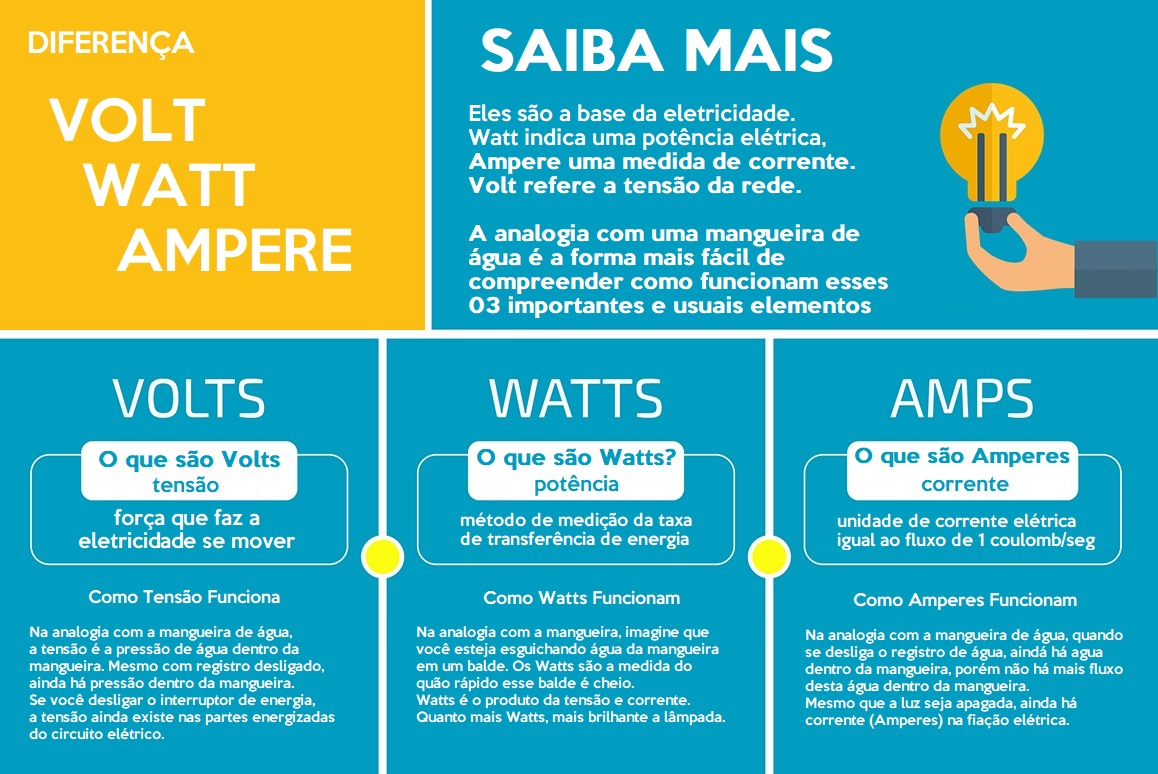
Volts (measured in V) are the electrical tension. Think of it as the "pressure" or "force" pushing electricity through wires.
- In the United States, standard household outlets provide 120V (for most devices) or 240V (for large appliances).
- Computer USB ports typically provide 5V.
2. Amperage (A) - The Flow
Amperes (measured in A) represent electrical current. It's the amount of electrons flowing through the wire at that moment—the "volume" of energy.
- A typical smartphone charger might deliver 2A.
- A powerful electric water heater can pull 30A or more.
3. Power (W) - The Result
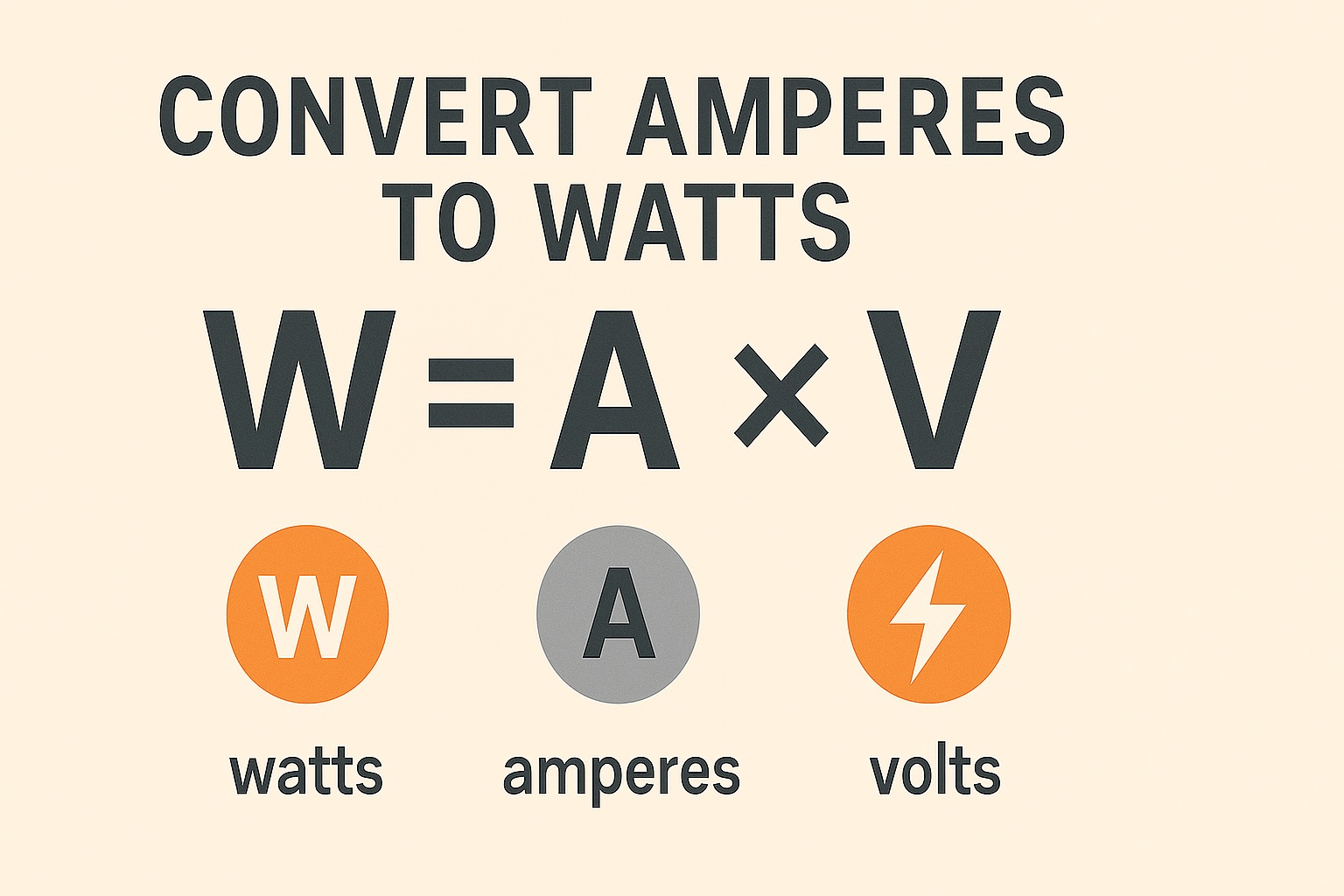
Watts (measured in W) are the actual power. It's the work electricity performs—the combination of pressure (Volts) and flow (Amperes).
- It's what makes a bulb shine brighter or your phone charge faster.
- The Magic Formula:
Watts = Volts x Amperes.
Pro Tip: If you have a 5V, 2A charger, its power output is 10 Watts (5 x 2 = 10). That simple.
The Water Tank Analogy (You'll Never Forget This)
If the technical stuff still seems confusing, picture a home water system. This is hands-down the best way to visualize it:
- Voltage (V) is the Height of the Water Tank: The higher the tank, the more pressure the water has coming down the pipe. If the pressure's too strong for a weak pipe, it bursts (the device fries).
- Amperage (A) is the Pipe Width: A wide pipe allows lots of water (high current) to flow. A narrow pipe (cheap USB cable) restricts water flow, no matter how much pressure you have up top.
- Watts (W) is the Amount of Water Delivered: It's the shower you take. If you have good pressure and a wide pipe, you get tons of water (high power).
If you want to dive deeper into how this energy powers your computer's processing, check out our article on what is a CPU and how it works, since stable power is crucial for performance.
120V vs 240V: The American Voltage Story
The United States uses a dual voltage system—120V for most household items and 240V for heavy-duty appliances like dryers, water heaters, and air conditioners.
The Efficiency Myth
Many people believe 240V devices use less energy than 120V devices. That's a myth.
- A 5,000W space heater uses the same energy whether it's 120V or 240V. Consumption is measured in Watts per hour, and 5,000W is 5,000W regardless of voltage.
- The difference: At 240V, the current (Amperes) is lower to achieve the same power. This allows for thinner wiring in construction, saving on installation costs—but not on your electric bill.
Automatic Dual-Voltage vs Switchable
Today, most small electronics (phone chargers, laptops, smart kitchen appliances) are automatically dual-voltage.
- They accept anything between 100V and 240V. Plug them in without worry.
However, items with powerful motors or heating elements (hair dryers, older blenders, cheap gaming PC power supplies) often have a voltage switch.
- The Danger: If the switch is set to 120V and you plug it into 240V, the device receives double the pressure it can handle. Result: instant fry.
- The Reverse: Plugging a 240V device into a 120V outlet usually won't damage it, but it'll work "weakly" (the fan spins slowly, the dryer doesn't heat).
Charger Power: The Secret to Fast Charging
This is where Watts confusion causes the most frustration. You buy a flagship phone that promises to charge in 30 minutes, but you use an old charger and it takes 2 hours. Why?
The Charging Negotiation
Modern charging (USB-C Power Delivery, Quick Charge) is a "conversation" between the charger and your phone.
- You plug in the cable.
- The phone says: "I can handle up to 45W of power."
- The charger says: "I can deliver up to 65W."
- They "agree" on 45W.
Bottleneck Scenario: If you use an ancient 5W charger (those tiny iPhone cubes) with a modern phone, the charger says "I only have 5W." The phone accepts it but takes forever to charge.
Should I Worry About "Too Many Watts"?
Nope. This is a super common concern. If you buy a beefy 100W laptop charger (like modern GaN—Gallium Nitride chargers) and connect it to earbuds that only need 2W, it won't fry. The device "pulls" the energy; the charger doesn't "push" it. The system only delivers what the device requests.
It's worth checking out our guide on how to choose a good charger for specific recommendations on GaN models that are smaller and more efficient.
What About Wireless Charging?
Same logic applies, but there's energy loss in the air transmission. A 15W wireless charger usually charges slower than a 15W cable due to heat dissipation.
Power Consumption Table: Which Devices Are Energy Vampires?
Understanding your devices' power (Watts) is key to avoiding sticker shock on your electric bill. The calculation is:
Power (W) x Hours of use / 1000 = kWh consumed.
Here's a comparison table to show you the power scale:
Device | Average Power (Watts) | Impact on Bill |
|---|---|---|
Phone Charger | 5W to 45W | Negligible |
50" LED TV | 90W to 150W | Low/Medium |
Gaming PC (Full Load) | 400W to 800W | Medium/High |
Air Fryer / Microwave | 1500W | High (short usage) |
Air Conditioner (9000 BTU Window Unit) | 800W to 1000W | Very High (extended use) |
Electric Water Heater | 4500W to 5500W | Supreme Villain |
For those working from home, understanding this is crucial. If you want to build an efficient setup, check out our post on best laptops for students and work, where we analyze models that balance performance with low energy consumption.
How to Choose the Right Cables and Accessories
Having a 100W charger doesn't help if your cable can only handle 10W. The cable is the "highway" where energy travels.
The Cheap Cable Bottleneck
Remember Amperage (pipe width)? Bargain-bin USB cables have super thin internal wires. If you try pushing high current (many Amperes) through them, the cable heats up (energy lost as heat) and power doesn't reach your phone quickly.
- Pro Tip: Look for cables that specify amperage (e.g., "Supports 3A" or "Supports 5A") or power (e.g., "100W charging").
An excellent option for organizing and ensuring quality is investing in certified fast-charging cables.
Protecting Your Investment
Beyond charging, you need protection. Power surges (voltage spikes when power comes back after an outage) are silent killers of graphics cards and gaming console power supplies.
- Surge Protector: The basics. Must have a fuse or circuit breaker. Avoid those $5 "power strips" that are just extensions with no protection.
- UPS (Uninterruptible Power Supply): Essential for anyone working with critical data or those with internet routers and security cameras. It keeps devices running for a few minutes so you can save work and shut down properly.
The Power Bank Revolution
When we talk about portable power, Watts logic intersects with milliampere-hours (mAh).
- Capacity (mAh): The size of the "fuel tank."
- Power (W): The speed at which it fills your phone's tank.
Many people buy massive power banks (20,000mAh) but with slow output (10W). The result is a "brick" that takes hours to add 10% charge to your phone. Always look for power banks with PD (Power Delivery) support of at least 20W.
Frequently Asked Questions
What happens if I plug a 110V device into a 220V outlet?
In most cases, the device will instantly fry. The voltage (pressure) is double what the internal components can handle, causing immediate overheating, smoke, and permanent damage to the power supply or main circuit.
Can I use a 100W charger on a phone that only supports 20W?
Yes, it's perfectly safe. The charging protocol (especially with USB-C) makes the phone "negotiate" the power. It'll only pull the 20W it needs. The charger will work "relaxed" and run cooler.
What's the difference between Watts and Volts?
Volts are the voltage (the force pushing energy). Watts are the power (the work performed by the energy). Think of Volts as water pressure in a hose, and Watts as how wet the grass is getting.
How do I know if my device is automatically dual-voltage?
Look at the label or text engraved on the plug/device itself. Look for "Input" or "Entrada." If it says "100-240V" or "110V~220V", it's automatically dual-voltage. If it only says "120V" or only "240V", it's not.
Do cables affect charging speed?
Yes, dramatically. Poor-quality cables have thin internal wires and bad connectors that resist energy flow. For charges above 18W, you need quality cables. For above 60W (laptops), you need cables with an "E-Marker" chip.
Does leaving a charger plugged in without the phone waste energy?
It does, but it's a tiny amount (residual consumption). A modern unused charger costs pennies per year. The bigger issue isn't cost but the durability of internal components that stay constantly energized.
Are voltage stabilizers useful nowadays?
For modern power supplies (computers and new TVs), no. In fact, old stabilizers can harm modern Active PFC power supplies. Go with a good surge protector (SPD) or a sine wave UPS instead.
Conclusion
Understanding the alphabet soup of electricity (Watts, Volts, Amperes) isn't just technical curiosity; it's a tool for saving money and protecting your stuff.
Now you know you don't need to fear using a powerful charger with your phone, but you should be terrified of plugging a 120V device into a 240V outlet. You also know the cable you use is just as important as the charger itself.
Before buying your next gadget or accessory, check the power and voltage specs. A smart investment in quality cables and electrical protection costs a fraction of replacing a fried iPad or gaming PC. Take care of your home's electricity, and your gadgets will last way longer.