How to Protect Your Smartphone: Screen Protectors, Cases & Security
The complete 2025 guide to protecting your phone from drops, scratches & threats with the right protectors and cases.
You just dropped $800+ on a new smartphone, and three weeks later, you drop it on the concrete. The screen shatters from corner to corner. Repair quote? $350. Sound familiar?
The good news? This headache is totally preventable. With the right protection, your phone can last years without a scratch, keeping its resale value and saving you from unexpected expenses that hit your wallet hard.
In this complete guide, you'll discover exactly how to protect your smartphone against the three main threats: physical damage (drops and scratches), digital threats (viruses and malware), and wear over time. I'll show you the best screen protectors, cases, and security apps of 2025, with everything explained clearly and practically.
![iPhone 16 Pro Max Case with Screen Protector & Lens Protector [15 FT Military Drop Protection] Magnetic Kickstand Compatible with MagSafe Slim Translucent Case (Black)](https://m.media-amazon.com/images/I/71-4ULDvpDL._AC_SX679_.jpg)
Table of Contents
- Why Protecting Your Smartphone Is a Smart Investment
- Screen Protectors: Which One for Your Screen Type
- Cases: Real Protection That Actually Works
- Antivirus: When You Actually Need It
- How to Apply a Screen Protector Without Bubbles (Step-by-Step)
- The 5 Most Common Mistakes That Compromise Protection
- Frequently Asked Questions
- Conclusion
Why Protecting Your Smartphone Is a Smart Investment
Think of your phone like a new car. You wouldn't drive around without insurance, right? With smartphones, the logic's the same, but many folks still think it's wasteful.
The numbers tell a clear story: replacing a screen on a mid-range phone costs between $100 and $300. On premium models like the iPhone 15 or Samsung Galaxy S24, that price jumps to $350-$450. That's up to 40% of the price of a new device.
The Real Cost of Not Protecting
Beyond immediate repair, there's the hidden cost of depreciation. A phone with a cracked screen or visible scratches loses 25-35% of its resale value. If you upgrade every two years, that difference can hit $300 on a single trade-in.
Malware infections also come with a price tag. According to a 2024 Kaspersky study, 23% of Americans who had infected phones needed to factory reset their device, losing photos, contacts, and important files. Another 15% had banking data compromised, resulting in average losses of $450.
Triple Protection: The Complete Approach
Protecting a modern smartphone requires three distinct layers:
Screen Protection: The screen is the most expensive and fragile component. A good protector absorbs the first impact in drops and prevents 90% of daily scratches. Investment: $15-$60.
Structural Protection: Cases with impact absorption protect the phone's corners, which concentrate 70% of cracks from drops. Certified models withstand falls up to 4 feet without damage. Investment: $30-$150.
Digital Protection: Antivirus software and security practices prevent data theft, breaches, and malicious apps that can brick your system. Investment: free to $120/year.
Do the math: you spend between $45 and $330 to fully protect a $1,000 device. That's just 4.5% to 33% of the value, but prevents losses that can reach $800+ in repairs and depreciation.
If you're looking for comprehensive smartphone protection tips, check out our guide on how to protect your smartphone for additional security measures.
Screen Protectors: Which One for Your Screen Type
You've probably seen that confusing variety of screen protectors: 3D, 5D, 9H, hydrogel, nano glass. But what really matters when choosing? Let me break this down for you.
Tempered Glass: The Fan Favorite for Good Reason
Tempered glass is the most popular, and with good reason. It goes through heat treatment that makes the glass up to five times stronger than regular glass.
How it works in practice: When you drop your phone, the protector absorbs the impact and cracks instead of your actual screen. It's literally a sacrificial shield that breaks to save your display.
Main advantages:
- Robust protection against impacts and deep scratches
- Touch feel identical to the original screen
- Easy to clean, doesn't retain fingerprints
- Simple installation, even for beginners
- Excellent value: $15-$40
Things to watch out for:
- Can shatter in very hard drops (but saves the screen)
- Doesn't adapt well to screens with pronounced curvature
- Adds 0.01-0.02 inches of thickness
Ideal for: Flat screens or those with gentle curvature (2.5D). Perfect for Samsung Galaxy A series, Motorola Edge, Xiaomi Redmi, and most mid-range phones. For more details on selecting the right accessories, see our guide on tech accessories for your home office.

Hydrogel Film: Flexibility That Doesn't Shatter
Hydrogel revolutionized protection for curved-screen smartphones. It's a flexible material, like a solid gel, that perfectly adapts to any screen shape.
How it works: Unlike glass that shatters, hydrogel absorbs impacts through flexibility. It's like the difference between a plastic ruler and a metal one: one breaks, the other bends.
Main advantages:
- Perfectly adapts to curved screens and rounded edges
- Never breaks or cracks, even in hard drops
- Self-healing of superficial scratches in 24-48 hours
- Smooth touch and preserved sensitivity
- Covers the screen edge-to-edge, including curves
Things to watch out for:
- Scratches more easily than tempered glass
- Installation requires more care and technique
- Slightly higher price: $30-$80
- Touch feel slightly different (you get used to it)
Ideal for: Samsung Galaxy S24/S23, Motorola Edge 40, Xiaomi 13 Pro, and any model with pronounced curved screens. Also great if you're clumsy and break glass protectors frequently.
3D, 5D, 10D Protectors: Marketing or Real Protection?
You've probably seen ads for 3D, 5D, 9D, or even 10D protectors. But what do these numbers actually mean?
The truth is there's no official standard for these names. Generally, they indicate tempered glass protectors that better adapt to screen curvature, covering more area than traditional ones.
What the numbers really say:
- 3D/4D: Basic curvature that follows lightly rounded edges
- 5D/6D: Greater coverage, with edge adhesive for better grip
- 9D/10D: More aggressive marketing, but similar protection to 5D/6D
Important to know: Higher numbers don't necessarily mean more protection. A 10D protector from an unknown brand might protect less than a quality 3D from a recognized brand.
My recommendation: Ignore the numbers. Focus on brand, material (tempered glass or hydrogel), thickness, and reviews from actual buyers. A good 3D protector from a trusted brand beats a generic 10D.

PET Film: When Budget Matters Most
PET (plastic) protectors are the cheapest on the market, costing between $5 and $15. They're those super thin, flexible ones that feel like transparent stickers.
Real advantages:
- Ultra-affordable price
- Super light, almost unnoticeable
- Easy to apply
- Protects against superficial scratches
Important limitations:
- Minimal impact protection
- Scratches easily
- Short lifespan (2-3 months)
- Can bubble or peel at edges
When it's worth it: If you baby your phone, never dropped it, and just want basic protection against keys in your pocket. Also useful as temporary protection while you buy something better.
For those who really want to protect their investment, it's worth spending the extra $20-40 on tempered glass. The difference in protection is totally worth it.
Cases: Real Protection That Actually Works
A screen protector covers your display, but 65% of smartphone damage happens on the back and sides. That's where the right case comes in.
Silicone Cases: Pretty But Barely Protective
These are the most common and cheapest. Those thin, colorful cases you find in any store for $15-$30.
Protection reality: Simple silicone cases only protect against light scratches and help with grip. In real drops, they offer minimal impact absorption.
When they work: For folks who handle their phone with extreme care, always at home or the office, and just want aesthetic protection against fingerprints and superficial marks.
When they don't work: If you carry your phone in your pocket with keys, have small kids, work in busy environments, or have dropped your phone a few times.
TPU Cases: The Balance Between Protection and Lightness
TPU (thermoplastic polyurethane) is more rigid than silicone but still maintains some flexibility. It's the material most "mid-range" cases use.
Main characteristics:
- More resistant than silicone, less than polycarbonate
- Good impact absorption on the sides
- Easy cleaning with soap and water
- Doesn't yellow easily (in quality models)
- Fair price: $25-$60
Real protection: Withstands drops up to 2.5 feet without significant damage. Above that, depends on the angle of fall and impact surface.
Ideal for: Daily use in common environments. Good choice if you want decent protection without making your phone too bulky or heavy. Learn more about protecting your devices in our article about how to make your battery last longer.
Rugged Cases: Military-Grade Protection for Your Pocket
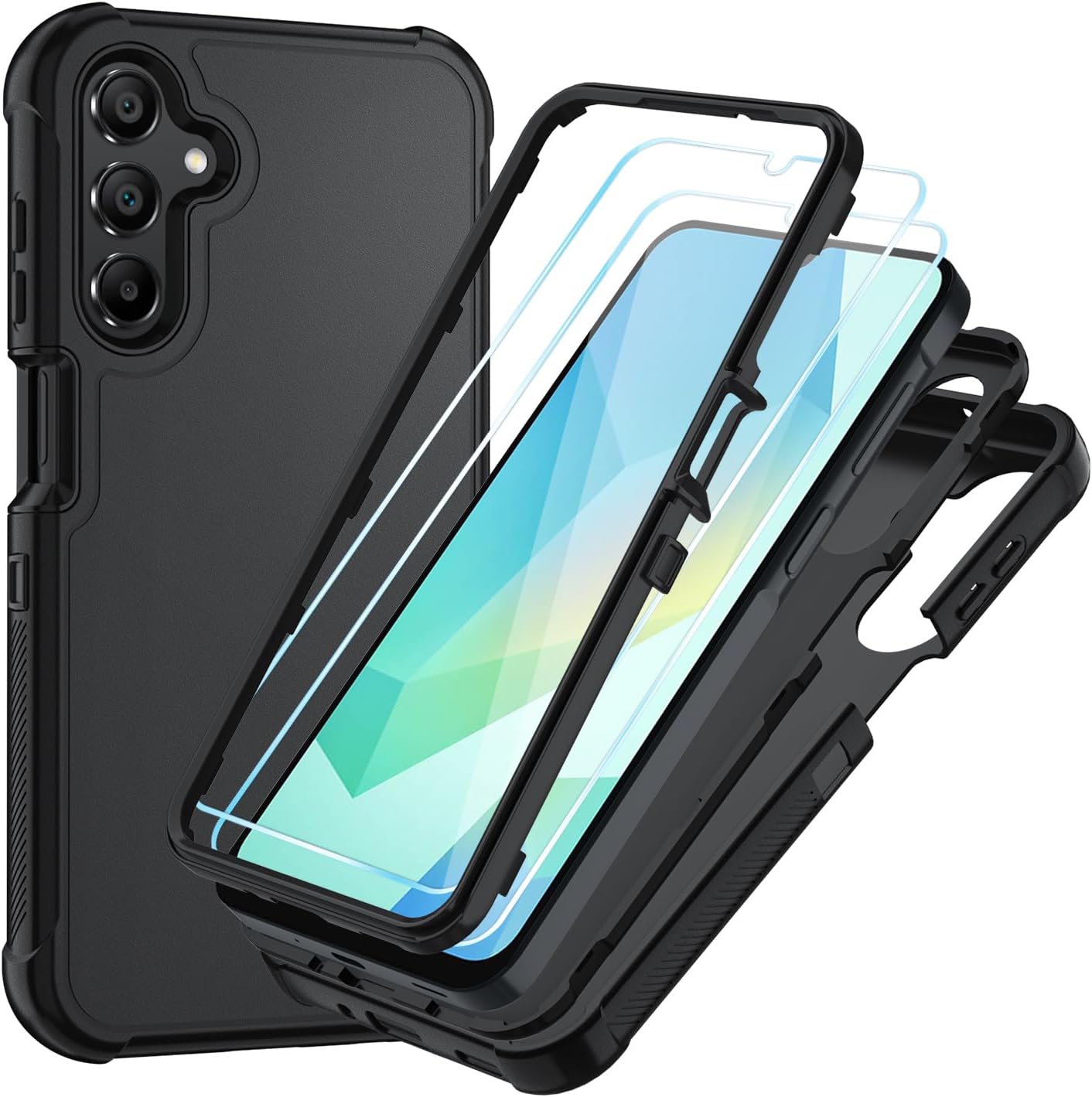
These are the protection champs. Usually made of rigid polycarbonate combined with TPU on the sides, with extra reinforcement at the corners.
Absorption technology: The corners have air pockets (air cushion) that work like miniature airbags. In a drop, these pockets compress and disperse impact energy.
Important certifications:
- MIL-STD-810G: Tested in 4-foot drops in multiple orientations
- Shock-proof: Protection against impacts up to 6+ feet
- Drop-tested: Passed real controlled drop tests
Visual features that indicate good protection:
- Raised edges in front (protects screen if it falls face-down)
- Raised edges in back (protects cameras)
- Visibly reinforced corners
- Dual-layer material
- Thickness of 0.08-0.12 inches
Downsides: They increase your phone's size and weight. If you prioritize slim design, it's not the best choice. But if you've cracked a screen before, you'll get used to the extra millimeters real quick.
Price: $50-$150. Seems expensive? Compare it to $300 for screen replacement.
Wallet Cases: 2-in-1 That Works
These flip-case style cases protect front and back, and still hold cards and documents. They're ideal for folks who value practicality.
Real advantages:
- Total protection, including screen when closed
- No need for separate wallet
- Built-in stand for watching videos
- Screen privacy when folded
Downsides to consider:
- Bulkier than regular cases
- Need to open to see notifications
- Don't work with wireless charging (most)
- Magnetic clasp can demagnetize stripe cards
Worth it for: Professionals who carry their phone in bags or briefcases, people who want maximum practicality, or anyone who values screen privacy on public transit.

Antivirus: When You Actually Need It
This is probably the most confusing question. I'll give you the straight, honest answer, no BS.
For Android: Yeah, You Probably Need It
Android is a more open system, which brings freedom but also vulnerability. Unlike iPhone, you can install apps from outside the Play Store, which opens doors to malware.
Data that matters: According to ESET, 61% of Americans using Android experienced some cyber-attack attempt in 2024. The most common attacks were phishing (36%) and fake apps disguised as games or tools (28%).
When antivirus is essential:
- You download apps from websites or APKs outside Play Store
- You use banking and payment apps on your phone
- You frequently connect to public Wi-Fi networks
- Kids or elderly people use the device
- Your phone no longer receives security updates
Free antivirus apps that work well:
-
Avast Mobile Security: Real-time protection, app lock, and Wi-Fi check. Free version works great.
-
Bitdefender Mobile Security: Light on battery consumption, excellent detection rate. Free version protects adequately.
-
AVG Antivirus: From the same company as Avast, with different interface and similar features. Also has functional free version.
Are paid versions worth it? Only if you want extra features like unlimited VPN, spam call blocking, and advanced anti-phishing. For basic malware security, free versions handle it.
For comprehensive digital security tips, explore our guide on how the internet works to better understand online threats.
For iPhone: Usually Not Necessary
iOS is a closed system and extremely controlled. Apple rigorously analyzes each app before approving it in the App Store, and the sandboxing system prevents apps from accessing sensitive areas.
Exceptions that call for antivirus on iPhone:
- You jailbroke the device (then yeah, you're vulnerable)
- You want extra protection against phishing on websites and emails
- You're looking for integrated VPN to browse with privacy
- You need parental control features
Reality: Malware cases on iPhone are extremely rare and usually limited to very targeted attacks. For 99% of people, iPhone comes protected out of the box.
Smarter alternative for iPhone: Instead of antivirus, invest in:
- Keeping iOS always updated
- Using strong passwords and two-factor authentication
- Not clicking suspicious links in SMS or email
- Making regular iCloud backups

What Works Better Than Antivirus
More important than any security app are your digital habits. Check out the practices that protect better than any antivirus:
Golden Rule #1: Only download apps from official stores (Play Store for Android, App Store for iPhone). This eliminates 80% of risks.
Golden Rule #2: Be suspicious of messages asking for personal info or urgent clicks. Banks never ask for passwords or data through SMS, WhatsApp, or email.
Golden Rule #3: Keep your operating system updated. Updates fix vulnerabilities that hackers exploit.
Golden Rule #4: Review app permissions. Does that game really need access to your contacts, camera, and location? Probably not.
Golden Rule #5: Use public Wi-Fi with extreme caution. Avoid accessing banking apps on open networks at malls, airports, or coffee shops.
Following these five rules, you'll be more protected than 90% of people who just install antivirus and continue with risky habits.
How to Apply a Screen Protector Without Bubbles (Step-by-Step)
Most bubbles and installation problems happen from skipping basic steps. Following this method, you'll get professional results at home.
Necessary Materials (Usually Come in the Kit)
- Screen protector compatible with your exact phone model
- Alcohol wipe
- Dry microfiber cloth
- Dust removal sticker (like tape)
- Squeegee or credit card
- Environment without much wind or dust
Step 1: Prepare the Environment (Don't Skip This)
Lots of people apply protectors anywhere and then complain about bubbles. The right environment makes all the difference.
Where to apply: Bathroom right after a hot shower (steam knocks dust out of the air) or at a clean, well-lit table.
Where NOT to apply: Outdoor area with wind, near open windows, in dusty environments.
Pro tip: Turn off fans and AC 5 minutes before. Airborne dust particles are enemy #1 of perfect application.
Step 2: Triple Screen Cleaning
First clean - Alcohol: Use the alcohol wipe (comes in kit) and clean the entire screen in circular motions. This removes grease and dirt.
Second clean - Drying: With the dry microfiber cloth, remove all moisture and alcohol residue. The screen should be completely dry with no marks.
Third clean - Final dust: Use the dust removal sticker (looks like adhesive tape) and gently tap across the entire screen. It captures invisible particles that would cause bubbles.
Done, your screen is 100% clean. Now don't touch it with your fingers anymore.
Step 3: Alignment Before Sticking
Common mistake: Sticking the protector randomly and trying to adjust after. Doesn't work.
Correct method: Hold the protector (still with protective plastic) over the phone and align perfectly with corners and front camera. See where it should sit before you start sticking.
Reference point: Use the front camera or top speaker as a guide. When they're centered, other points naturally align.
Step 4: Gradual Application (Gravity Technique)
Here's where the magic happens:
- Remove the bottom protective plastic from the protector
- Align the top of the protector with the top of the phone
- Touch just the top edge, without pressing
- Hold the phone at a 45° angle and release the protector gradually
- The protector sticks by itself through gravity, pushing air out
Why it works: When you release gradually, air doesn't get trapped. If you press everything at once, you create air bubbles that get stuck.
If small bubble appears: Use the squeegee or card to gently push from center toward the nearest edge. 95% of bubbles come out this way.
If large bubble or dirt appears underneath: Carefully lift the protector until you pass the dirt, remove with dust sticker, and reapply. You have about 3 tries before the adhesive loses grip.
Step 5: Final Finish
With the protector applied, use the squeegee to apply light pressure across the entire surface, especially at edges. This ensures the adhesive fully bonds.
Some protector models take 24 hours to stick 100%. During this period, avoid pressing hard, keeping the phone in tight pockets, or using very snug cases. After that time, adhesion reaches maximum level and small marks usually disappear on their own.
The 5 Most Common Mistakes That Compromise Protection
Even investing in good accessories, many users end up drastically reducing their smartphone protection through simple mistakes — and totally avoidable ones.
1. Buying Generic "Universal" Screen Protector
Universal protectors rarely cover the entire screen correctly, leave edges exposed, and don't respect sensors or cameras.
Result: less protection and higher chance of cracks.
Golden rule: always choose a protector specific to your phone's exact model.
2. Using Case Just for Looks
Super thin or just decorative cases absorb almost no impact. In the first drop, energy goes straight to the screen.
Prefer:
- Reinforced TPU
- Polycarbonate
- Raised edges (protect screen and camera)
3. Believing "I Never Drop It"
Behavioral studies show most drops happen by accident, distraction, or slip — not from constant carelessness.
Fact: the first drop is usually the most expensive.
4. Installing Sketchy or Pirated Antivirus
Apps from outside the Play Store or fake antivirus can do exactly the opposite of what they promise: steal data, show ads, or install malware.
Tip: only use known and well-reviewed solutions.
5. Not Replacing Cracked Screen Protector
A broken protector no longer protects. On the contrary, it already absorbed the impact and lost its function.
Clear signs to replace:
- Cracks
- Lifted edges
- Reduced touch sensitivity
For more tips on maintaining your tech devices, check out our guide on how to choose the right power bank for emergency charging.
Frequently Asked Questions
What's the best type of screen protector for phones?
For flat screens, tempered glass offers the best value with solid protection against impacts and scratches. For curved screens, hydrogel adapts better and won't shatter easily, making it ideal if you want durability without the cracks.
Do I really need antivirus on my phone?
For Android, yes. The system is more open and vulnerable to malware, especially if you download apps outside the Play Store. For iPhone, it's usually unnecessary due to iOS's robust security, except if you've jailbroken your device.
Does hydrogel protect better than tempered glass?
Not necessarily. Tempered glass offers better protection against hard impacts but shatters easily. Hydrogel is more flexible and durable, won't crack, but can scratch more easily. Your choice depends on your usage style.
How much does it cost to replace a smartphone screen?
Screen replacement can cost anywhere from $100 to $400+, depending on the model. For premium phones like the iPhone 15, repairs can reach 40% of the device's value. Investing in proper protection prevents these expenses.
Do cases really protect against drops?
Yes, but it depends on the material. TPU, polycarbonate, or military-grade cases offer good protection from drops up to 4 feet. Decorative silicone cases provide minimal protection in heavy impacts.
Do free antivirus apps work well?
Yes. Options like Avast, AVG, and free Bitdefender offer efficient basic protection against common malware. Paid versions add features like VPN, advanced anti-phishing, and auto-cleaning, but aren't necessary for casual use.
Conclusion
Protecting your smartphone isn't overkill — it's a smart decision based on cost-benefit.
With:
- A screen protector suited to your display type
- A genuinely protective case
- And good digital security practices
you drastically reduce the risk of financial losses, data loss, and unnecessary headaches.
💡 Quick summary:
Spending $80-$150 on protection today can prevent a $350+ repair tomorrow.
If you use your phone every day for work, school, or fun, protecting it isn't optional — it's essential.
Want to dive deeper into smartphone technology? Check out our articles on what is RAM, what is a CPU, and what is a GPU to understand what makes your device tick.