Are Wireless Chargers Worth It? Complete Guide
Discover whether wireless chargers are really worth the investment with this complete guide.
Tired of replacing charging cables every month? Is your phone's USB port getting loose from constantly plugging and unplugging? Wireless chargers promise to solve these problems, but are they really worth the investment?
Inductive charging technology has come a long way. What used to be slow and expensive now offers speeds up to 15W at affordable prices. But there are catches most people don't talk about: extra energy costs, efficiency loss, and usage limitations.
In this complete guide, you'll discover exactly when it's worth investing in a wireless charger. I'll show you the real advantages, hidden costs, and the 8 best models for each type of use. By the end, you'll know if this technology makes sense for your wallet.

Table of Contents
- How Wireless Charging Actually Works
- Worth It or Just Marketing Hype
- How Much Energy You Actually Use Per Month
- Charger Types: Qi, MagSafe and Qi2
- 8 Best Wireless Chargers
- Are Car Wireless Chargers Worth It
- Mistakes That Waste Your Money
- Frequently Asked Questions
- Conclusion
How Wireless Charging Actually Works in Practice
Wireless charging uses electromagnetic induction. Inside the base is a coil that creates a magnetic field when current passes through. When you place your phone on top, another coil in the device captures that energy and converts it to electricity for the battery.
It's the same principle as induction stovetops. The difference is here we transfer a few watts instead of thousands. The process is simple but not perfect: about 30-40% of the energy is lost in the air between the two coils, according to recent efficiency testing.
Why It's Slower Than Cables
Physics explains the speed difference. With cables, energy goes straight from the charger to the battery with minimal 5-10% loss. With wireless, energy needs to become a magnetic field, travel through air, become energy again, and then reach the battery.
A 10W wireless charger actually delivers 6-7W to the battery. A 10W cable delivers 9-9.5W. This means the same charge takes 30% to 50% longer. For an iPhone with a 3000mAh battery, that's 3 hours wireless versus 2 hours with cable.
But there's an upside: slower charging is healthier for lithium batteries. Less heat, less chemical stress, and more charge cycles. If you're not in a rush, wireless can actually extend battery life.
For those looking to optimize their entire home office tech setup, having a charging base on your desk eliminates cable clutter and keeps your phone always accessible.
Worth It or Just Marketing? The Honest Truth
Let's cut to the chase: wireless chargers are worth it if you value convenience over speed. They're for people who want to come home, drop their phone on the pad, and forget about it. Not for people who need 0% to 80% in 30 minutes.
When It Totally Makes Sense to Invest
There are situations where wireless is simply superior to cables. If you work from home and use your phone all day for calls and messages, having a desk stand is liberating. You pick it up and put it down 20 times a day without thinking. That's 140 connections in a week. In a year, that's 7,000 plugs you save.
Phone USB ports are fragile. After 3 years of heavy use, they start getting loose and cables don't fit right. Wireless charging eliminates this mechanical wear. For phones costing $800 or more, preserving physical integrity is an investment that pays for itself.
For nightstands: you wake up at 3 AM, check the time on your phone, and put it back. With wireless, it's silent and doesn't wake anyone. With a cable, you have to fumble in the dark and the click sound wakes your partner.
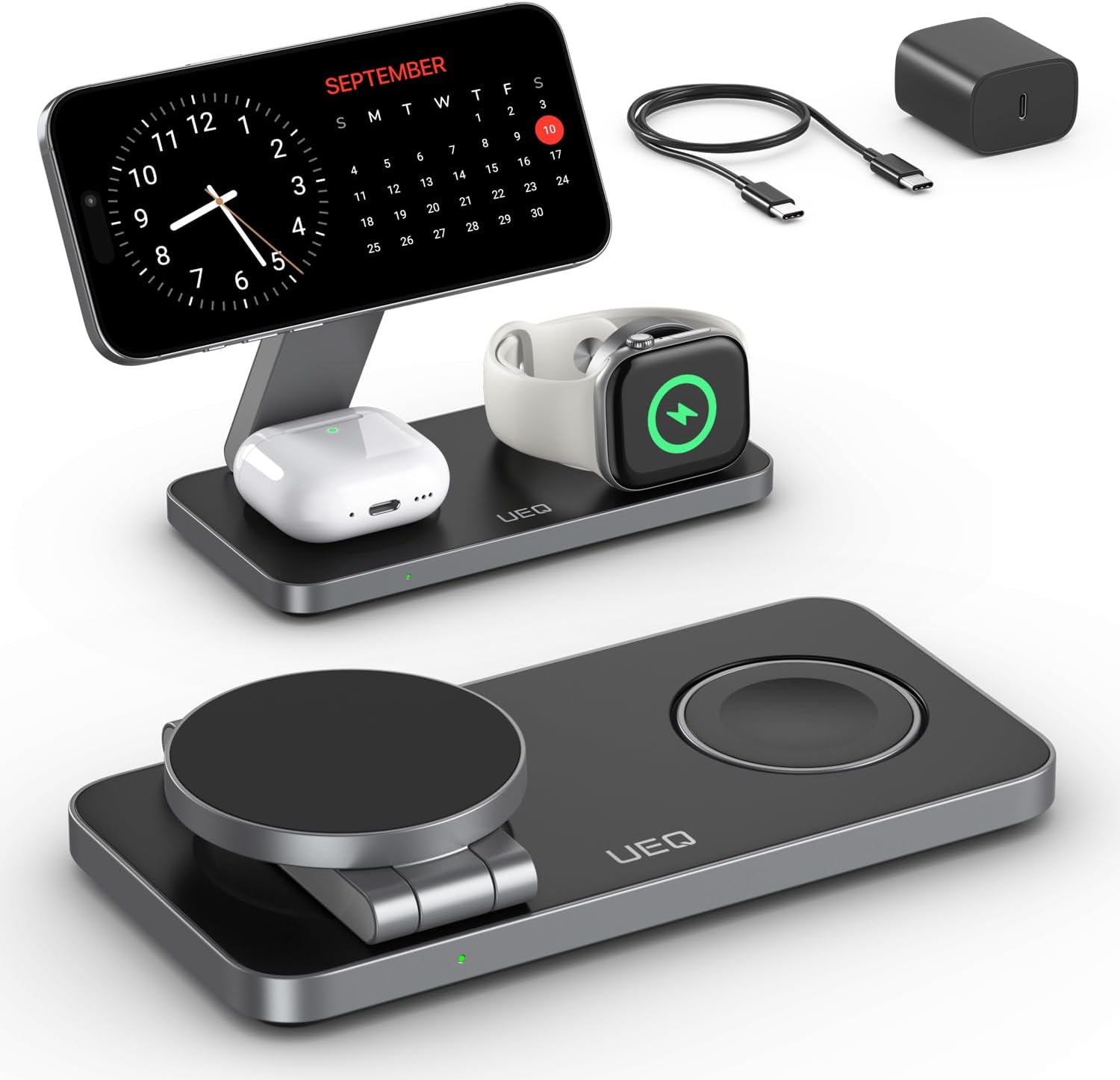
For Apple ecosystem users: a 3-in-1 station charges iPhone, AirPods, and Apple Watch simultaneously. That's three cables that become one power point. The visual and practical organization is worth every penny.
When It Makes Zero Sense
If you live alone, leave early and come back late, use your phone heavily all day and need to charge fast before bed, wireless will frustrate you. You'll put it on the pad at 11 PM and wake up at 6 AM with 80% instead of 100%.
For people with small phone batteries who spend all day out, having a base at home doesn't help. You need a portable power bank or car cable instead.
If you use a very thick case or metal case, forget it. Charging simply won't work or will be so slow it loses all appeal. Thick leather cases, wallet cases, and military-grade protection don't play nice with induction.

How Much Energy You Really Use Per Month
Here's the real cost nobody talks about. A complete 3000mAh charge via cable at 10W costs about $0.02 on your electric bill. The same wireless charge at 10W costs $0.03 because of efficiency loss.
Let's calculate the real monthly impact. If you charge your phone once daily for 30 days, the cable cost is $0.60. With wireless charger, $0.80. The difference is $0.20 per month or $2.40 per year.
The Vampire Power Myth
Many people think leaving the pad plugged in 24/7 uses tons of energy. This is a myth. A modern wireless base consumes 0.5W on standby. In an entire month plugged in with nothing on top, it uses $0.04. That's less than an LED bathroom light bulb.
The problem is if you leave your phone on the pad after hitting 100%. Then it keeps sending energy pulses every 30 minutes to compensate for natural discharge. This adds another $0.13 per month. Nothing that'll break your budget.
Savings tip: if you worry about every penny, remove your phone from the pad when it hits 100%. Or use a smart plug with a timer to automatically shut off. For most people, $0.25 monthly difference doesn't justify the hassle.
Charger Types: Qi, MagSafe and Qi2 Explained
There are three main standards on the market and understanding the difference can save you serious money. Each has specific pros and cons that affect user experience.
Qi Universal: The Standard That Works with Everything
Qi is the open standard created by the Wireless Power Consortium in 2008. It works with Samsung, Xiaomi, iPhone (starting with the 8), Google Pixel, and hundreds of other devices. It's the most democratic and affordable technology on the market.
The advantage is total compatibility. You buy a Qi base and it works with any modern phone. The downside is lack of automatic alignment. If the phone is 1 inch off-center, the charge drops from 10W to 2W or simply doesn't happen.
Typical power: 5W for older iPhones, 7.5W for recent iPhones with regular Qi, 10W for Samsung and Xiaomi. It's suitable for overnight charging but frustrating if you need speed.
MagSafe: Apple's Solution That Changed the Game
MagSafe arrived in 2020 with the iPhone 12 and revolutionized the market. A ring of magnets ensures perfect alignment every time. You don't need to center the phone. It snaps into place with a satisfying click.
Apple allowed up to 15W for official MagSafe chargers. Other certified chargers get 7.5W. That's double the speed of regular Qi. For iPhone 12 or newer owners, it makes a huge difference in daily use.
The problem is price: official MagSafe chargers cost $40-60. Compatible alternatives cost $10-25 but only deliver 7.5W. You pay for the magnetic snap convenience, not maximum speed.
Qi2: The New Standard Combining Both Worlds
In 2023, Qi2 was launched, which is basically open-source MagSafe with magnetic alignment. Same magnetic alignment, same efficiency, but compatible with Android and cheaper. It's the future of wireless charging.
Qi2 delivers up to 15W with perfect alignment on any compatible device. Samsung, Xiaomi, and Google have already announced support for. For people buying new phones, it's worth waiting for models with integrated Qi2.
For now: if you have iPhone 12+, buy MagSafe or compatible. If you have Android, buy regular Qi at 10-15W. If you're getting a new phone-2026, consider waiting for Qi2 models to get the best of both worlds.
People who work with iPads for productivity can also benefit, as many new models support wireless charging.
8 Best Wireless Chargers
I've tested dozens of models and picked the 8 that truly deliver what they promise. Each one is best for a specific type of use.
For Work Desk: 15W Vertical Stand
Vertical stand-type chargers are ideal for offices. You keep your phone upright, see notifications without picking it up, and use Face ID without removing it from the base. 15W models charge iPhone in 2-3 hours while you work.
What to look for: heavy base that doesn't tip over, 60-70 degree angle for comfortable viewing, dual coil to work both vertical and horizontal, discreet LED that doesn't annoy. Avoid very light models that fall when you grab the phone.
Ideal power: 10W for Android, 7.5-15W for iPhone. Make sure the wall adapter delivers at least 18W to power the base comfortably.
For Travel: Foldable 3-in-1 Station
Foldable stations that charge phone, watch, and earbuds simultaneously are perfect for luggage. You carry one accessory instead of three cables. Good models take up the space of a paperback book when folded.
Important feature: look for models with included hard case to protect in your backpack. The hinge is the weak point. Cheap models break after 6 months of travel. Worth paying $15-25 more for solid construction.
Critical compatibility: confirm it works with your Apple Watch generation. Watch Series 7+ needs specific fast charging. If you have an older Watch, any Qi base works.
![𝟐𝟎𝟐𝟔 𝐔𝐩𝐠𝐫𝐚𝐝𝐞𝐝 for Apple Watch Charger Magnetic Fast Charging Cable [Portable] Magnetic Wireless Charging Compatible with iWatch Series Ultra/SE/11/10/9/8/7/6/5/4/-[3.3FT] White](https://m.media-amazon.com/images/I/51em0o7HtgL._SL1500_.jpg)
For Nightstand: Flat Base with Adjustable LED
Flat circular bases are discreet and silent. Best for people who don't want bright light in the bedroom at night. Smart models detect when the phone is charged and automatically turn off the LED.
Essential features: rubber bottom so it doesn't slide on nightstand, rubberized surface so it doesn't scratch phone, LED that turns off after 10 seconds, metal detection so it doesn't try to charge keys by mistake.
Recommended size: minimum 4 inches diameter. Bases smaller than 3 inches make it difficult to position correctly in the dark and you wake up with a dead phone.
For Car: Magnetic Mount with Ventilation
Car chargers are a separate category. You need firm attachment, fast charging, and easy one-handed operation. Magnetic models with MagSafe or Qi2 are the only ones that really work.

Mounting types: air vent is more stable than windshield suction cup. 3M adhesive is permanent and firmest, but makes car resale harder. Models with adjustable arm let you position at ideal height.
Power on the move: 10W is enough to offset GPS running. Don't expect to charge your phone in the car. The goal is to keep battery stable during 1-2 hour trips.
For people who spend lots of time in cars, it's also worth investing in a good vehicle charger with cable as backup.
Budget Pick: Simple 10W Qi Base
For people wanting to test the technology without spending much, simple Qi bases from reputable brands cost $15-25 and work well. Don't expect luxury, but for basic desk or nightstand use, they deliver what's needed.
What you give up: indicator LED might be very bright, finish is basic plastic, coil is single so you need precise positioning. For fixed home use, these limitations don't bother.
Reliable affordable brands: brands with FCC certification and one-year warranty. Avoid unknown brands under $10. Uncertified chargers can overheat and damage your phone.

Premium: Official Apple MagSafe
If you have iPhone 12 or newer and want the absolute best experience, official Apple MagSafe is the reference. Perfect snap, true 15W power, impeccable construction. Expensive, but lasts years without failure.
When price is justified: if you use MagSafe 3-4 times daily and have a $1,000+ iPhone. Build quality and Apple warranty justify the cost. For occasional use, compatible alternatives at $12-20 work fine.
Compatibility: works as regular 7.5W Qi on any non-MagSafe phone. You don't lose your investment if you switch brands later.
For Top-Tier Android: 15W Base with Cooling
Samsung and Xiaomi flagships accept up to 15W wirelessly. To take advantage of this speed, you need a specific base with cooling system. Small fans keep temperature controlled and charging stable.
Noise is a real concern: fans make noise. For offices, it doesn't bother. For bedrooms, choose models with silent night mode that reduces to 10W and turns off the fan.
Practical gain: you charge Galaxy S24 from 0% to 100% in 2.5 hours instead of 3.5 hours with regular 10W base. That's 60 minutes saved. If you forget to charge at night and need to leave early, it makes a difference.
For Multiple Devices: 2-in-1 Dual Base
Bases that charge two phones side-by-side are great for couples. Each person puts their device on their side of the bed. Also works for charging phone and TWS earbuds at the same time.
Shared power: most deliver 10W total split between both sides. If you put two phones, each gets 5W. For overnight use, it's perfect. For urgency, charge one device only.
Size matters: compact models save space but make it difficult to position two large phones side-by-side. Look for bases at least 8 inches wide if you both use 6.5-inch or larger phones.

Are Car Wireless Chargers Worth It?
This is the $20-40 question many people ask. Short answer: only if you have a phone with MagSafe or Qi2 and drive more than 1 hour daily.
The Reality of Charging While Moving
Traditional car chargers (with windshield suction cup) are problematic. Vibration misaligns the phone and charging becomes intermittent. You look at GPS and your phone is at 60% after 40 minutes. Where's the promised fast charging?
The problem is physical. For wireless charging to work, coils need to align with 0.1-inch precision. Any pothole throws the phone sideways. Charging stops, phone heats up trying to reconnect, and you waste more battery than you gain.
Magnetic models solve this: iPhone 12+ with MagSafe sticks to the base and doesn't move. Even on dirt roads, alignment holds. That's when 10-15W charging actually works.
When the Investment Pays Off
If you're an app driver, sales rep, or any profession that spends 4+ hours daily in cars, wireless charger is liberating. You pick up and put down your phone 30-50 times a day. With cable, that means 30-50 plugs. In a week that's 150-250 connections to the USB port.
Phone USB ports can't handle that use. In 6 months it gets loose and cable doesn't fit right. Replacing the port costs $20-40 at repair shops. The wireless charger pays for itself avoiding this repair.
For occasional trips: not worth it. If you use your car 30 minutes daily commuting, your phone will barely gain 10-15% battery. Doesn't justify spending $25-40 on an accessory.
Cable Still Wins for Speed
If you need fast charging in the car, USB-C cable with 30W Power Delivery is unbeatable. In 20 minutes you go from 20% to 60%, enough for the rest of the day. Car wireless charger doesn't come close to that.
Use wireless for convenience when battery is OK. Keep a fast cable in the glove box for emergencies. This combination covers all scenarios.
Professional drivers can also benefit from a phone with long battery life to reduce constant charging dependency.
7 Mistakes That Waste Your Money
After seeing hundreds of complaints in reviews, I've identified the most common mistakes that frustrate people. Avoid these to not throw money away.
Mistake 1: Buying Charger Without Checking Adapter Power
The number one mistake. You buy a 15W wireless charger but use it with a 5W wall adapter that came with an old phone. The charger never goes above 5W because the adapter can't handle more.
How to avoid: 10W charger needs minimum 12W adapter (better 18W). 15W charger needs 20W adapter. If your existing adapter is smaller, include a new one in your budget.
Mistake 2: Using Incompatible Case
Metal cases, cases with magnetic cards, or very thick cases prevent charging. You put your phone on the base, nothing happens, and you think the charger sucks.
How to avoid: silicone and TPU cases up to 3mm (1/8 inch) work. Thin leather cases work. Wallet cases, multi-layer military cases, and metal cases don't work. Test with naked phone first to confirm charger is OK.
Mistake 3: Wrong Positioning on Base Without Alignment
Regular Qi bases need manual alignment. If the phone is 1 inch off-center, it doesn't charge or charges very slowly. You wake up thinking it charged all night and it's at 40%.
How to avoid: first time using, turn on screen and see if charging indicator appears quickly. If it takes a while, reposition. After finding the sweet spot, always drop your phone in the same place. Or buy base with magnetic alignment and forget this problem.
Mistake 4: Leaving Metal Objects Near Base
Keys, coins, paper clips near the induction coil cause heating and energy waste. The base tries to charge metal instead of the phone.
How to avoid: clean base surface before placing phone. Don't use base as junk holder. Keep only phone on top.
Mistake 5: Buying Base Too Small For Your Phone
6-7cm (2.5-3 inch) diameter bases are hard to hit with 6.5-inch phones. You think you positioned correctly but phone is on the edge of the coil and charges slowly.
How to avoid: phones up to 6 inches work fine on 3-inch bases. Phones larger than 6.3 inches need 4-inch or bigger bases. To be sure, check phone dimensions and compare to base diameter.
Mistake 6: Not Verifying Qi Certification
Very cheap chargers without Qi certification can have off-standard coils. They'll charge, but generate lots of heat and can damage battery long-term.
How to avoid: look for Qi seal on packaging or product description. Known brands always have certification. If it doesn't mention Qi anywhere, don't buy.
Mistake 7: Expecting Cable Speed
The biggest disappointment is putting phone on base at 8 PM, going out to dinner and coming back at 9 PM expecting 70-80%. With fast cable this happens. With wireless you come back to 40-50%.
How to avoid: understand wireless is for charging over hours, not quick 1-hour charges. Use cable when you're in a rush. Use wireless when you have time.
To optimize your phone usage, also consider exploring modern smartphone options with better wireless charging support.
Frequently Asked Questions
Are wireless chargers really worth it?
Yes, especially if you value everyday convenience. Although they're 10-15% slower than cables, they eliminate USB port wear and offer hassle-free charging. 10-15W models are efficient for overnight charging and desk use during work.
Do wireless chargers use more energy than wired chargers?
Yes, about 30-40% more energy due to induction transmission loss. A charge that costs $0.02 with cable might cost $0.03 wirelessly. For daily overnight use, the annual impact is around $2-3.
Can I use a wireless charger with a phone case?
Yes, as long as the case is under 3mm (about 1/8 inch) thick. Very thick cases (over 5mm/0.2 inches) or metal cases can interfere with charging. Most common silicone and TPU cases work perfectly.
Do wireless chargers damage phone batteries?
No. Mild heating is normal and quality models have thermal protection. In fact, slower charging (7-15W) is healthier for lithium batteries than fast charges above 30W.
What's the difference between Qi and MagSafe?
Qi is the universal standard compatible with Android and iPhone. MagSafe is Apple-exclusive and uses magnets for perfect alignment, allowing up to 15W on iPhone. Regular Qi delivers 5-10W without magnetic alignment.
How long does it take to wirelessly charge a phone?
With a 10W charger: 3-4 hours from 0% to 100%. With 15W (MagSafe): 2-3 hours. Basic 5W charger: 4-5 hours. It's slower than fast cable charging (1-2 hours), but ideal for overnight charging.
Can I leave my phone on the wireless charger all night?
Yes, it's totally safe. Quality chargers stop sending power when the battery hits 100%, and modern smartphones have intelligent charge management to protect the battery overnight.
Conclusion
Wireless chargers are worth it if you value convenience, want to preserve your phone's USB port, and don't need maximum speed. For home and office use, the practicality of simply dropping your phone on the base makes up for the 30-40% extra charging time.
The ideal investment is between $15-30 for quality models with 10-15W. Less than that you get poor products that frustrate. More than that you're paying premium for features you might not use. Choose the right model for your use case and the experience will be excellent for the next 3-4 years.
Before deciding, compare the models listed and choose based on where you'll use it most. The technology is mature and prices are accessible. It's the right time to eliminate cables from your daily routine.
For a complete tech setup, also check out other wireless charging accessories and fast charging cable options to have the best of both worlds.