Is a Kindle Worth It? Complete Buying Guide
Discover if investing in a Kindle makes sense. Models, features, comparisons, and everything you need to know.
Ever found yourself lugging around three books in your bag and ditching the fourth because it would've weighed too much? Or run out of battery on your phone right at the most intense chapter?
Digital reading has completely changed in recent years. The Kindle has become one of the most popular devices among readers, but with so many options on the market, the question remains: is it really worth investing in a device just for reading?
In this complete guide, you'll discover everything about the Kindle—from real advantages to an honest comparison with tablets and smartphones. I'll show you which model to choose, how much it costs to maintain, and whether the investment makes sense for your reading profile.
Get ready to make an informed decision about your next reading companion.
Table of Contents
- What Is a Kindle and How Does It Work
- Why a Kindle Is Different from a Tablet
- 5 Real Advantages of Owning a Kindle
- Kindle vs Smartphone vs Tablet: Honest Comparison
- Kindle Models: Which to Choose
- Kindle Unlimited: Is It Worth Subscribing?
- Who the Kindle Is NOT Worth It For
- Frequently Asked Questions
- Conclusion: Make the Right Choice
What Is a Kindle and How Does It Work
Before deciding if it's worth it, you need to understand what exactly a Kindle is. And no, it's not a tablet.
The Kindle is an electronic device created by Amazon exclusively for digital reading. Sounds simple, but this specialization makes all the difference in the experience.
The Technology Behind the Screen
The main differentiator is the electronic ink screen, called e-ink. It works completely differently from smartphone or tablet screens.
How it works in practice: The e-ink screen uses millions of microcapsules with black and white pigments that rearrange when you turn the page. Once positioned, they stay put without consuming power. That's why the battery lasts for weeks.
The result? A screen that looks like real paper. No harsh glare on your eyes, no visual fatigue you get after 40 minutes on your phone. You can read for hours without discomfort.
Crucial difference: LCD and OLED screens on smartphones emit light directly into your eyes. The e-ink screen reflects ambient light, exactly like a printed page. Your eyes will thank you.
Features You'll Use Every Day
The Kindle isn't just a pretty screen. It comes with features designed specifically for readers:
- Built-in dictionary: Tap any word and see the meaning instantly, without leaving the page
- Highlights and notes: Mark important passages and make notes that are saved in the cloud
- Font adjustment: Change size, typeface, and spacing for maximum comfort
- Front-lighting: Built-in LEDs illuminate the page evenly, without glare
- Automatic sync: Start reading on your Kindle and continue on your phone exactly where you left off
All this works without internet. You only need Wi-Fi to download new books or sync data.

Access to the World's Largest Digital Bookstore
When you buy a Kindle, you gain direct access to Amazon's store with millions of titles. It's like having an infinite library in your pocket.
Practical advantage: Saw someone talking about a book on social media? In less than 1 minute you're already reading. No leaving home, no waiting for delivery, no sold-out books.
Digital books cost on average 40% less than printed versions. A novel that costs $30 in print typically goes for $15 to $18 as an e-book. The savings add up quickly.
For those looking for other digital reading options, check out our guide to iPads for work and editing which also covers reading formats.
Why a Kindle Is Different from a Tablet
Many people think: "Why buy a Kindle if I already have a tablet?" The answer lies in specialization.
A tablet wants to do a thousand things. The Kindle wants to do one thing perfectly: provide the best possible reading experience.
The Screen Battle: E-ink vs LCD
This is the fundamental difference that changes everything. Let's be practical:
On a tablet: After 30 minutes reading, your eyes start to burn. The blue light from the screen interferes with sleep if you read at night. You need to increase brightness in sunlight, draining more battery.
On a Kindle: You read for 3 hours straight without noticing time pass. The screen becomes clearer under direct sunlight. Your eyes don't tire because there's no direct light hitting them.
Science backs this up: studies show that reading on e-ink screens reduces eye fatigue by up to 60% compared to LCD screens after 2 hours of continuous reading.
Focus vs Distraction: The Real Game Changer
Here's the real problem with tablets: they do everything, and that's terrible for reading.
You're in the middle of an emotional chapter when a text message pops up. Then another from Instagram. You think "I'll just take a quick look"... and 20 minutes have passed.
The Kindle's silent advantage: No Instagram, no text messages, no YouTube trying to grab your attention. It's just you and the book, period. This intentional limitation is what makes the Kindle so effective.
Readers who switched from tablet to Kindle report reading an average of 35% more books per year. The reason? Fewer distractions means more pages turned.
Battery: Weeks vs Hours
You know that frustration when you're at the best part of a book and the tablet warns "10% battery remaining"?
Tablet: With mixed use (reading, videos, browsing), lasts 8 to 12 hours before needing a recharge. Just reading, maybe 15 hours.
Kindle: With a full charge, you read for 6 to 12 weeks. Yes, weeks. That's considering 30 minutes of reading per day.
The difference is in e-ink technology: it only consumes power when you turn the page. The idle screen uses nothing. That's why you can travel for a whole week without even thinking about the charger.

Weight and Portability: The Detail That Matters
It seems trivial, but after holding a device for 1 hour, every ounce makes a difference.
Tablets: Weigh between 10.5 oz and 23 oz. After 40 minutes holding it, your arm needs a break.
Kindle: Weighs between 5.6 oz and 7.3 oz. You can read lying down, holding it with one hand, without that wrist pain.
Size also counts. The Kindle fits in any purse, backpack, or even a large jacket pocket. A 10-inch tablet requires planning to transport.
For those working from home and looking to organize their space better, I recommend our essential tech accessories for home office.
5 Real Advantages of Owning a Kindle
Now that you understand the technical differences, let's get to what really matters: how the Kindle improves your reading life day-to-day.
1. Carry an Entire Library in Your Pocket
Imagine having access to 4,000 books without taking up an inch of shelf space. Sound like an exaggeration? It's exactly what a 16GB Kindle offers.
Real situation: You're traveling and want reading options. Fiction book to relax, a business book to learn, maybe a mystery for variety. In print, that means carrying 4.4 lbs extra in your luggage. On the Kindle? Zero additional ounces.
Portability completely transforms the reading experience. On the subway, at the beach, waiting in line at the bank, in the doctor's waiting room. Whenever a moment arises, your books are right there.
Pro tip: Create collections within your Kindle organizing by genre or priority. It's much easier to choose what to read among so many options.
2. Real Savings That Add Up Over Time
Let's do the math honestly. A Kindle costs between $110 and $280, depending on the model. Seems expensive at first glance.
But compare it to the cost of print books:
- Print novel: $15 to $30
- Same novel as e-book: $8 to $15
- Average savings: $10 per book
Simple calculation: If you read 2 books per month, you save about $20 monthly. In 1 year, that's $240 saved. The Kindle pays for itself in less than 12 months.
Not to mention many literary classics are available for free. Mark Twain, Edgar Allan Poe, Jane Austen... zero dollars.
Unexpected bonus: You don't have to choose between buying one book or another due to budget. With cheaper e-books, your purchasing power increases considerably.

3. Read Where and How You Want Without Limitations
The Kindle's versatility surprises even those who've owned the device for years.
At the beach: The e-ink screen becomes even clearer under bright sunlight. Try doing that with a smartphone and you'll understand the difference. And if you have the Paperwhite, it's waterproof. Pool splashes? No problem.
In bed, in the dark: The adjustable front lighting illuminates perfectly without bothering whoever's sleeping next to you. You control the intensity according to the time and your comfort.
On long trips: Plane, bus, train. Wherever you are, the weeks-long battery ensures you'll never be without reading material.
The customization experience is also impressive. Prefer larger letters? Serif or sans-serif font? More line spacing? Light or dark background? You adjust everything in seconds.
4. Discover New Authors Without Fear of Making a Mistake
Here's an advantage many people don't consider: the Kindle makes you a more adventurous reader.
With physical books, there's always that fear: "What if I spend $25 on a book and don't like it?" The result? You end up always reading the same authors, stuck in your comfort zone.
The Kindle changes this: With lower prices and the ability to read free samples of any book, you experiment without fear. New author? Read the first two chapters for free and decide.
Plus, Amazon's recommendation function works really well. Based on what you've already read, it suggests titles you'll probably enjoy. I've discovered dozens of amazing authors this way.
Practical result: Kindle readers report reading more varied genres than when they only read print. This enriches your experience and broadens horizons.
If you like to diversify your digital entertainment, also check out our tips on smartwatches for fitness and health.
5. Features That Transform How You Read
The Kindle isn't just a paper substitute. It adds features impossible with physical books.
Instant dictionary: Reading in English or another language? Tap any word and see the meaning without leaving the page. Perfect for those learning languages or wanting to expand vocabulary.
Smart search: Remember a specific passage but don't know what page it was on? Type a keyword and find it in seconds. In a physical book, you'd spend 15 minutes flipping pages.
Color highlights: Mark important passages in yellow, blue, or red. All your highlights are organized in a list for future review.
Magic sync: Start reading on your Kindle, continue in the phone app during lunch, pick up on your tablet at night. Everything syncs automatically. You always continue exactly where you left off.

Kindle vs Smartphone vs Tablet: Honest Comparison
Time for truth. Let's compare all three devices side by side, without romanticizing any of them.
Visual Comfort: The 2-Hour Test
I did a simple personal experiment: read the same book for 2 hours straight on each device. The results were revealing.
On smartphone: After 45 minutes, my eyes needed a break. Slight burning, urge to blink more. At 90 minutes, I had to stop. The blue light was causing real discomfort.
On tablet: Better than the phone due to the larger screen, but at 70 minutes eye fatigue arrived. The holding position also became uncomfortable.
On Kindle: I completed the 2 hours without noticing time pass. Zero visual discomfort. Could've continued for more hours without a problem.
Practical conclusion: For readings over 30 minutes, the Kindle wins hands down. For quick lookups or short articles, any will do.
Reading Experience: What Really Matters
Let's be honest about each aspect:
Criteria | Smartphone | Tablet | Kindle |
|---|---|---|---|
Visual comfort | Poor | Fair | Excellent |
Battery | 8-12h | 10-15h | 6-12 weeks |
Focus | Very low | Low | Total |
Weight | 5.3-7.8oz | 10.5-23oz | 5.6-7.3oz |
Reading in sunlight | Poor | Poor | Perfect |
Versatility | High | Very high | Low |
Starting price | $200-800 | $150-1000 | $110-280 |
When to Use Each One
There's no single answer. Each device shines in specific situations:
Use your smartphone for: Reading quick news, short articles, messages. Reads of 5 to 15 minutes where practicality matters more than comfort.
Use a tablet for: Colorful comics, technical books with complex graphics, PDFs that need a larger screen. Also for when you want to alternate between reading and other activities.
Use a Kindle for: Novels, biographies, non-fiction. Any reading over 30 minutes where you want total immersion without distractions.
The most honest answer? If you read more than 3 books a year and spend more than 2 hours weekly reading, the Kindle is worth every penny.
For tech enthusiasts in general, also check out our guide on how to choose a gaming laptop.
Kindle Models: Which to Choose
Amazon offers three main models. Let's understand the real differences so you can choose the ideal one.
Basic Kindle (11th Generation): The Best Value
This is the entry-level model that Amazon updated in 2024, and the improvements were significant.
Main specs:
- 6-inch screen with 300 ppi (same sharpness as pricier models)
- Front lighting 25% brighter than previous generation
- Battery up to 6 weeks
- 16GB storage
- Weight of just 5.6 oz
- USB-C charging
Price: Starting at $110
The real differentiator: For the first time, the basic Kindle has the same screen quality as premium models. The 300 ppi resolution means text is as sharp as printed paper.
Ideal for: Readers who want the best reading experience without paying for extra features. If you mainly read at home or in dry environments, this model is perfect.
What's missing: It's not waterproof and doesn't have automatic light sensor. But for most people, that doesn't matter in day-to-day use.
Kindle Paperwhite: Readers' Favorite
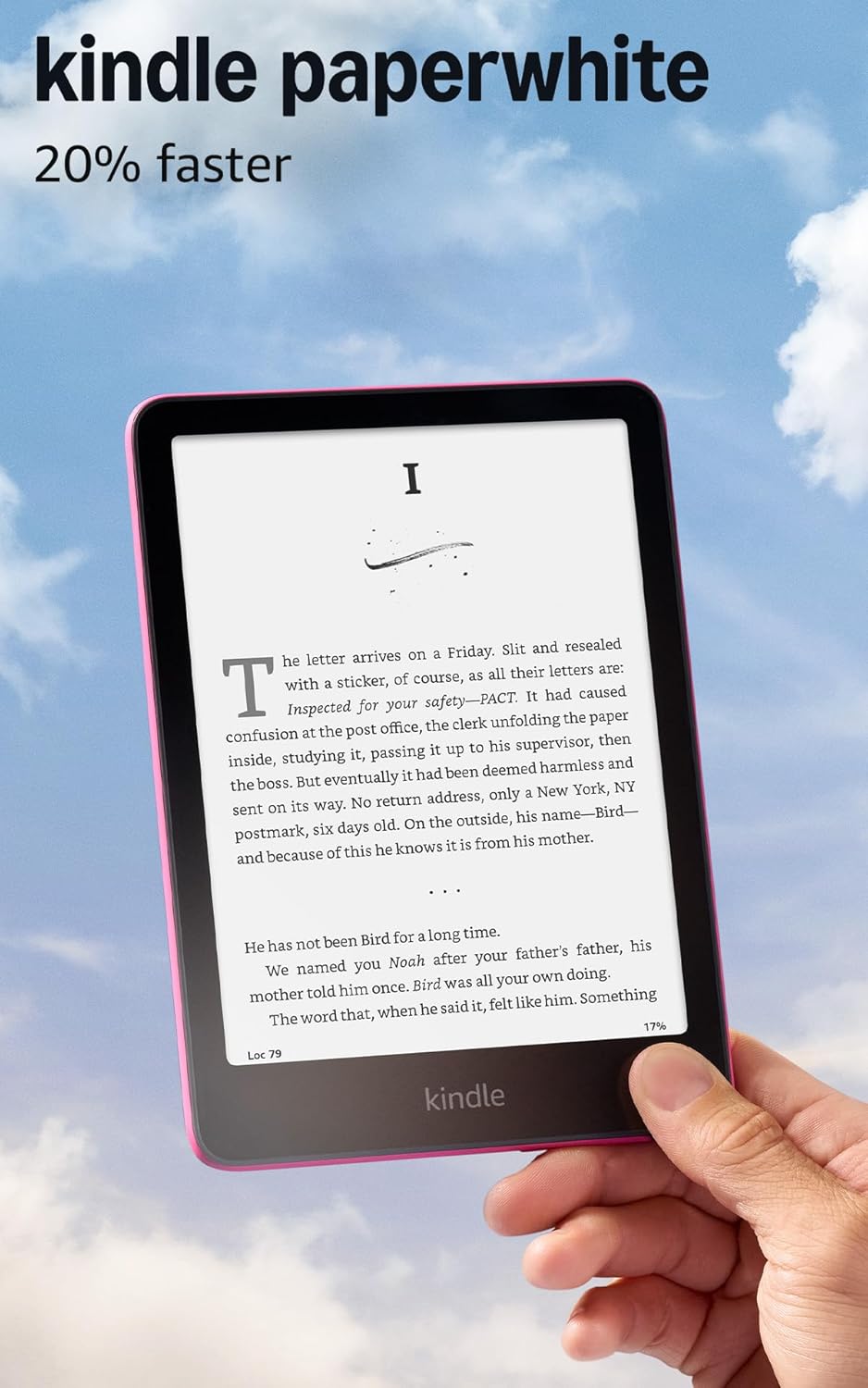
This is the best-selling Kindle model, and it's no coincidence. It offers the perfect balance between features and price.
Main specs:
- 6.8-inch screen (17% larger than basic)
- 300 ppi resolution
- Light temperature adjustment (amber screen for nighttime reading)
- IPX8 water resistance
- Battery up to 12 weeks
- 16GB storage
- Page turns 25% faster
Price: Starting at $160
The differentiators that matter:
IPX8 water resistance means you can read in the bathtub, pool, or at the beach without worry. If you drop it in water, it can handle up to 60 minutes submerged at depths up to 6.5 feet.
The light temperature adjustment is underrated until you use it. At night, you switch to warmer tones (orangey) that don't disrupt sleep. It's based on the same science as blue light filters.
Ideal for: Readers who want extra durability and like reading anywhere. Especially those who read at night before sleeping will appreciate the temperature adjustment.
Kindle Paperwhite Signature Edition: For Those Who Want the Best
The Signature Edition adds three premium features to the standard Paperwhite.
Exclusive differentiators:
- 32GB storage (double the standard)
- Wireless charging
- Automatic light sensor
Price: Starting at $200
Worth the extra investment? Depends on your use:
The 32GB storage makes sense if you plan to download audiobooks (each takes up about 100MB) or hundreds of technical books with images. For those who only read novels, 16GB already stores over 4,000 books.
Wireless charging is convenient, but you'll need to buy a compatible base separately. Handy if you already have a Qi base at home.
The automatic light sensor adjusts brightness according to the environment. Useful, but not essential, since adjusting manually takes 2 seconds.
Ideal for: Tech enthusiasts who want all features or those who plan to use audiobooks frequently.

Which Model to Choose? Quick Decision Guide
Use this mental flowchart:
Do you mainly read at home or office? → Basic Kindle is perfect.
Do you like reading in the bathtub, pool, or beach? → Standard Paperwhite is a must.
Do you plan to use audiobooks or have many technical books with images? → Paperwhite Signature Edition is worth it for the 32GB.
Still unsure? → Go with the standard Paperwhite. It's the sweet spot of the line: has all important features without paying for what you'll rarely use.
Kindle Unlimited: Is It Worth Subscribing?
Now that you've decided which Kindle to buy, another question arises: does Kindle Unlimited make sense?
What Is Kindle Unlimited
It's a subscription service that works like "Netflix for books." For $11.99 monthly, you get unlimited access to over 5 million titles in English and other languages.
How it works: You can have up to 20 books "borrowed" at the same time. Read and didn't like it? Return it and grab another. No additional fee, no exchange limit.
The Decision Math
Let's do the practical calculations:
Scenario 1 - Casual reader (1 book per month):
- Average cost of 1 e-book: $12
- Unlimited cost: $11.99
- Difference: Basically even
Scenario 2 - Regular reader (2 books per month):
- Cost buying: $24
- Unlimited cost: $11.99
- Savings: $12.01 per month ($144.12 per year)
Scenario 3 - Voracious reader (4+ books per month):
- Cost buying: $48+
- Unlimited cost: $11.99
- Savings: $36+ per month ($432+ per year)
Obvious conclusion: If you read 2 or more books per month, Kindle Unlimited pays for itself.
The Catalog: The Issue Nobody Talks About
Here's the honest caveat: not all books are available on Unlimited.
What you easily find:
- Bestsellers that are a bit older (1-2 years ago)
- Independent authors (many are excellent)
- World literature classics
- Personal development and business books
- Contemporary romances
- Children's and young adult literature
What's generally NOT in the catalog:
- Very recent releases from major publishers
- Some current bestsellers
- Highly specialized technical books
Smart strategy: Use Unlimited for most readings and buy separately only the releases you don't want to wait for.

Free Trial: Try Without Commitment
Amazon offers 30 days free of Kindle Unlimited. My recommendation: sign up, download 10 books you want to read, test the service. If it's not worth it, cancel before the trial ends.
There's no catch. It's really free and cancellation is simple (3 clicks on the website).
To better organize your home office reading routine, also check out our guide on essential home office accessories.
Who the Kindle Is NOT Worth It For
Being honest about limitations is as important as highlighting advantages. The Kindle isn't for everyone, and that's okay.
You Love Physical Books (For Real)
If you're one of those who loves the smell of paper, the weight of a book in your hands, the sound of pages turning, the Kindle won't replace that experience.
E-ink tries to replicate paper, but it's not the same thing. The texture, the smell, that tactile sensation are missing. For some readers, that's fundamental.
But consider this: Many people who "loved physical books" discovered they actually loved reading. The Kindle doesn't replace the paper experience, but offers convenience that makes you read more.
Test before judging. You might be surprised and end up using both formats in different situations.
You Read Less Than 2 Books Per Year
If your reading amounts to 1 or 2 books annually, the Kindle investment isn't financially justified.
With such low volume, buying physical books or digital ones directly in the phone app is more economical. The Kindle only pays off when use is frequent.
Alternative: Start reading on the free Kindle app on your phone or tablet. If you notice you're reading more, then consider buying the device.
You Prefer Books With Lots of Images
Colorful comics, art books, cookbooks with photos, technical manuals with complex diagrams. All are limited on the Kindle.
The e-ink screen is grayscale. No colors. And even in grayscale, complex images aren't as sharp as on paper or LCD screens.
Exception: If it's black-and-white manga, the Kindle works well. But for colorful comics or illustrated books, a tablet or physical paper are better choices.
You Have No Patience With Electronics
The Kindle is simple, but it's still an electronic device. You need to charge it occasionally, log into Amazon, download books, sync devices.
If you're the type who gets frustrated with technology or prefers the total simplicity of grabbing a book off the shelf and starting to read, maybe the Kindle adds unnecessary friction.
But know this: The learning curve is minimal. If you use a basic smartphone, you'll use the Kindle without difficulty in 10 minutes.
Frequently Asked Questions
How long does a Kindle battery last?
A Kindle battery can last from 6 to 12 weeks depending on the model and usage. The basic Kindle lasts around 6 weeks, while the Paperwhite can reach up to 12 weeks on a single charge, as long as you read about 30 minutes per day with moderate lighting.
Can I read on a Kindle without internet?
Yes, you can read all books already downloaded to your Kindle without an internet connection. Internet access is only required to download new books, sync your library, or access the online dictionary.
Is it better to read on a Kindle or on a smartphone?
The Kindle is better for long reading sessions because it uses an e-ink display that does not emit blue light and is easier on the eyes. In addition, it has no distracting notifications. A smartphone works for quick reading, but the LCD screen causes more eye strain after about 30 minutes.
How many books fit on a 16GB Kindle?
A 16GB Kindle can store approximately 4,000 to 6,000 digital books, depending on the size of each file. Since a typical e-book takes between 2MB and 5MB, the storage is more than enough for most readers.
Is Kindle Unlimited worth it?
It’s worth it if you read two or more books per month. The subscription costs R$ 24.90 per month and offers access to more than 1 million titles. If you usually spend R$ 30 or more per month on books, the savings are guaranteed.
Can I lend books from my Kindle to other people?
Yes, it is possible to lend Kindle books, but with limitations. The feature must be enabled by the publisher, each title can only be lent once for 14 days, and during that period you will not have access to the book.
Is the Kindle waterproof?
It depends on the model. The Kindle Paperwhite and Paperwhite Signature Edition have an IPX8 rating, meaning they can withstand up to 60 minutes submerged in fresh water. The basic Kindle, however, has no water protection and should be kept away from liquids.
Conclusion
So, in the end, is it worth buying a Kindle? The honest answer: it depends on your reader profile.
If you read 2 or more books per month, spend more than 2 hours per week reading, and value visual comfort, the Kindle is not just a good investment—it’s transformative. You’ll read more, with greater comfort, and spend less in the long run.
For occasional readers who pick up one book every three months, the smartphone or tablet you already own works just fine. Investing in a Kindle may not make financial sense.
The good news? You don’t have to decide now. Download the free Kindle app on your phone, buy an e-book, and test it for a week. If you find yourself reading more and enjoying the experience, then it’s worth investing in the dedicated device.
The Kindle won’t completely replace physical books for many people—and that’s okay. But it offers a valuable complementary experience that makes reading more accessible, portable, and comfortable. Check out the available models and choose the one that best fits your lifestyle.