What Is FPS And How It Affects Gaming And Video Quality
Learn what FPS means, why it matters for gaming and videos, and how to optimize your frame rate for the smoothest experience.
Ever notice how some games feel buttery smooth while others seem choppy even though they look similar? The secret lies in FPS.
Frame rate determines whether your gaming experience feels responsive or frustrating. When you understand FPS, you unlock the ability to optimize every screen you use, from gaming to streaming to everyday browsing.
In this guide, you'll discover what FPS really means, why it matters more than you think, and practical ways to improve frame rates across all your devices. Let's make your visual experience smoother than ever.
Table of Contents
- What FPS Actually Means
- Why FPS Matters For Gaming Performance
- How FPS Affects Video Streaming Quality
- FPS vs Hz: Understanding Your Display
- Hardware Components That Control FPS
- Ideal Frame Rates For Different Activities
- Proven Ways To Boost Your FPS
- Frequently Asked Questions
- Conclusion
What FPS Actually Means
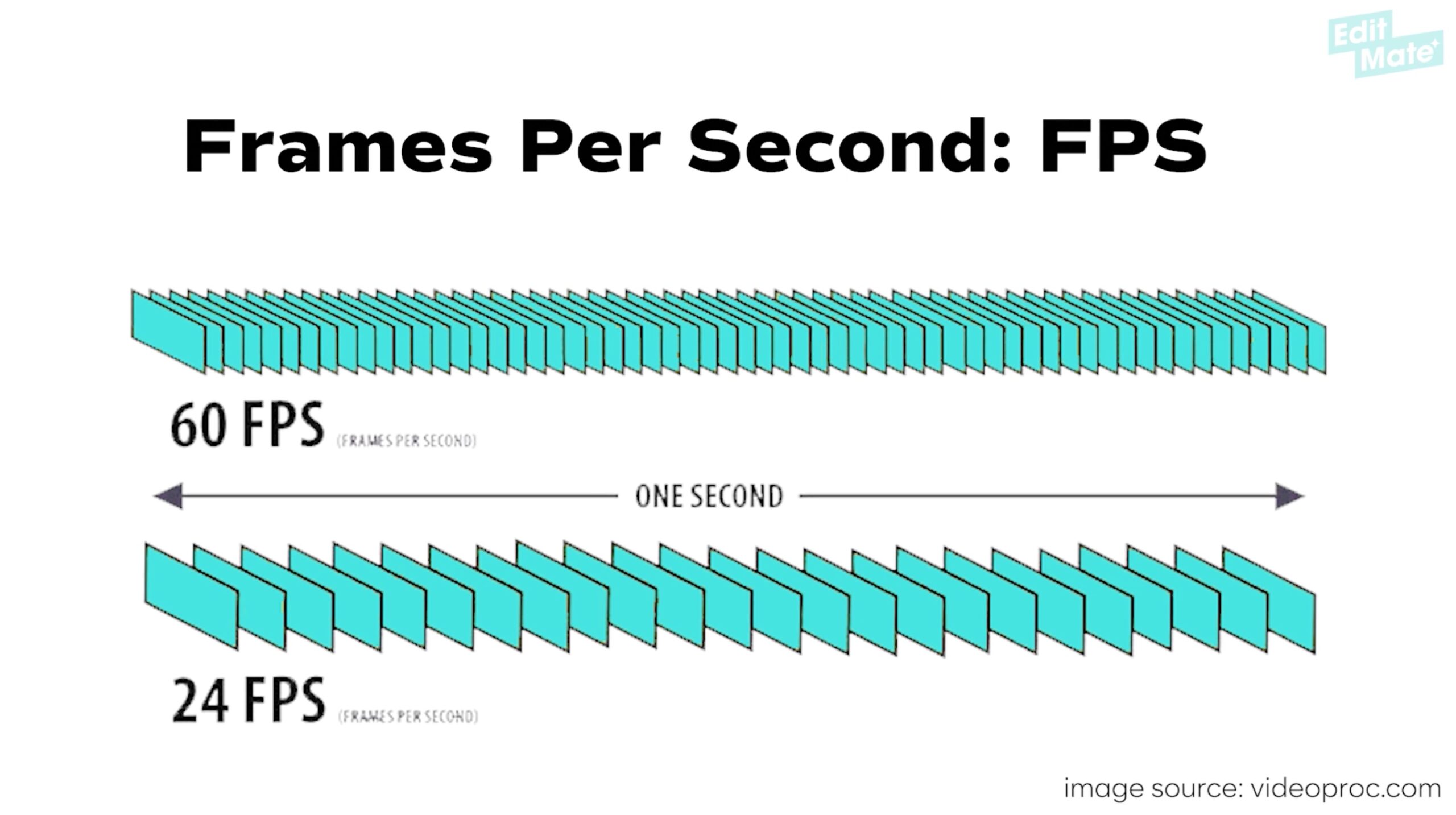
FPS stands for Frames Per Second. Think of it like a digital flipbook where each page shows a slightly different image.
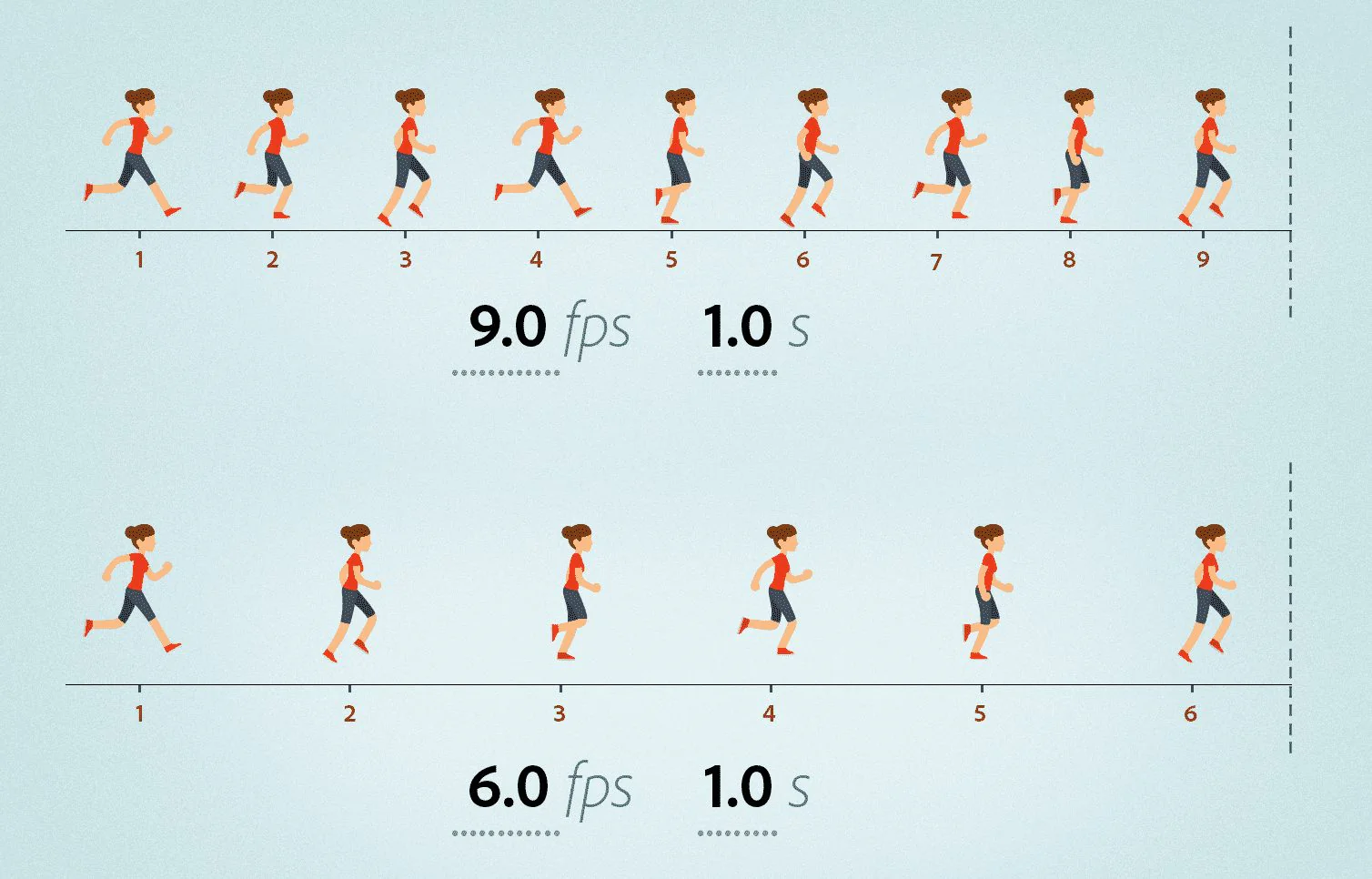
Your screen displays individual static images in rapid succession. When these images change fast enough, your brain perceives smooth motion instead of individual pictures. The more frames shown per second, the smoother everything looks.
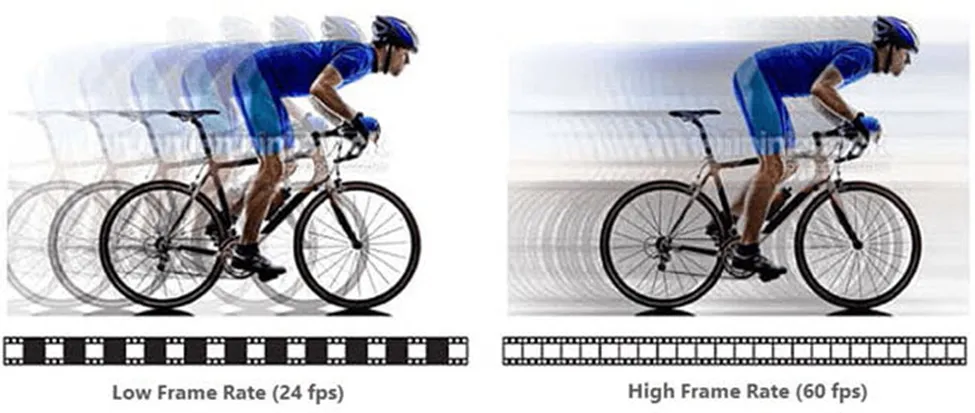
Movies traditionally use 24 FPS because that creates the cinematic feel we're used to. Modern games aim for 60 FPS or higher to feel responsive and fluid. The human eye starts perceiving motion around 10-12 FPS, but we need much higher rates for truly smooth experiences.
Your graphics card generates these frames constantly while you play games or watch videos. More powerful hardware can produce more frames per second, which directly translates to smoother visuals on your screen.
Why FPS Matters For Gaming Performance
Frame rate can literally determine whether you win or lose in competitive gaming. Higher FPS gives you measurable advantages that directly impact your gameplay.
Faster Visual Response
In competitive shooters, a player running at 144 FPS sees enemies appear approximately 7 milliseconds before someone playing at 60 FPS. This tiny advantage makes a huge difference in head-to-head confrontations.
Your brain processes visual information faster when receiving more frames. You spot movement earlier, track targets more accurately, and react to threats quicker.
Smoother Mouse Control
Higher frame rates make mouse movements feel more precise and immediate. When you flick your aim toward an enemy, the cursor responds instantly without noticeable delay.
This matters tremendously in games requiring quick reflexes. Your mechanical skills translate better to screen actions when FPS stays consistently high. Lower frame rates create a disconnect between your movements and what appears on screen.
Reduced Input Lag
Input lag measures the delay between pressing a button and seeing the action happen. More frames per second means new images generate more frequently, cutting down this delay significantly.
Competitive players obsess over reducing every millisecond of input lag. Higher FPS delivers more responsive controls that feel tighter and more connected to your actions.
For serious gamers looking to optimize their complete setup, check out our guide on choosing the best gaming monitors that complement high frame rates perfectly.
How FPS Affects Video Streaming Quality
Frame rate impacts your viewing experience just as much as resolution or color quality. Different content types work best at specific frame rates.
Movies And TV Shows
Traditional cinema uses 24 FPS, creating that characteristic movie look we associate with Hollywood productions. This frame rate feels natural because we've been conditioned by decades of film at this standard.
Some modern films experiment with higher rates like 48 FPS or 60 FPS. These look different—sometimes too smooth—because they break from the traditional cinematic feel. The debate continues about whether higher frame rates improve or hurt movie watching.
YouTube And Social Content
Online videos typically run at 30 FPS or 60 FPS depending on content type. Talking head videos and vlogs work perfectly fine at 30 FPS since they don't show much motion.
Gaming videos and action content benefit enormously from 60 FPS. The extra smoothness captures fast movement much better, making gameplay footage more enjoyable to watch. Many creators now shoot everything at 60 FPS as the new standard.
Live Streaming Platforms
Twitch and YouTube Gaming streamers usually broadcast at 30 FPS or 60 FPS. The choice depends on internet upload speeds and how important smoothness is for that specific content.
Competitive gaming streams almost always use 60 FPS because viewers want to see the action clearly. Slower-paced content like chatting or creative work can get away with 30 FPS without noticeable quality loss.

FPS vs Hz: Understanding Your Display
People constantly confuse FPS and Hz, but understanding the difference helps you build better gaming setups and avoid wasting money.
What Hz Measures
Hz refers to your monitor's refresh rate—how many times per second the screen can update its image. A 144Hz display refreshes 144 times per second, while a 60Hz monitor only refreshes 60 times.
This represents your display's maximum capability. No matter how many frames your graphics card produces, your monitor can only show images as fast as its refresh rate allows.
How They Work Together
Your GPU generates frames (FPS) while your monitor displays them (Hz). Both need to match for optimal performance and smooth visuals.
If your game runs at 120 FPS but your monitor only supports 60Hz, you're literally wasting half those frames. The screen can't display what the GPU produces. Conversely, a 144Hz monitor with a game running at 30 FPS means the screen refreshes mostly with repeated frames.
Sync Technologies Fix Mismatches
G-Sync and FreeSync dynamically adjust your monitor's refresh rate to match your GPU's frame output. This eliminates screen tearing and stuttering that happen when FPS and Hz don't align perfectly.
These technologies become essential when frame rates fluctuate during gameplay. Instead of seeing visual artifacts, you get smooth performance even as FPS varies between 90 and 144.
Understanding display technology helps you make smarter purchases. Our article on resolution standards and display quality explains the complete picture.
Hardware Components That Control FPS
Not all computer parts affect frame rate equally. Knowing which components matter most helps you upgrade strategically.
Graphics Card Dominates Performance
Your GPU handles all the heavy lifting for generating frames. It renders 3D graphics, applies visual effects, and outputs the final image to your monitor.
A more powerful graphics card directly translates to higher FPS, especially at higher resolutions and maximum settings. This single component influences frame rate more than anything else in your system.
Budget gamers can often double their FPS just by upgrading the graphics card. This makes GPU selection the most important decision when building or upgrading a gaming PC.
Processor Provides The Foundation
Your CPU prepares data and sends instructions to the graphics card. In games with complex AI, physics calculations, or many on-screen characters, processor speed becomes crucial.
Modern games increasingly use multiple CPU cores. A faster processor with more cores maintains higher minimum frame rates, reducing stuttering and frame drops during intense gameplay moments.
Bottlenecking happens when your CPU can't feed data to the GPU fast enough. Balancing both components ensures neither limits your overall performance.
RAM Connects Everything
Memory acts as a highway between your processor and graphics card. Insufficient or slow RAM creates bottlenecks that tank frame rates, especially in modern games with high-resolution textures.
Most current games run best with 16GB of RAM at decent speeds. Less memory forces your system to use much slower storage as backup, destroying performance. Our guide on how RAM impacts performance explains this in detail.
Storage Affects Loading Times
SSDs don't directly increase FPS during gameplay, but they dramatically reduce loading screens and asset streaming. You spend more time actually playing at high frame rates instead of staring at loading bars.
Some open-world games stream assets constantly from storage. Fast SSDs prevent stuttering when loading new areas, maintaining smoother frame rates during exploration.
Ideal Frame Rates For Different Activities
No single frame rate works perfectly for everything. Matching FPS to your specific activity creates the best experience.
Casual Single-Player Games
Story-driven adventures, RPGs, and exploration games play smoothly at 60 FPS. You don't need ultra-high frame rates since these games prioritize visuals over split-second reactions.
Even 30 FPS works acceptably for very casual gaming, though 60 FPS feels noticeably smoother. Invest your hardware budget in graphics quality rather than chasing extremely high frame rates.
Many console gamers play comfortably at 30-60 FPS in these genres. The cinematic feel actually enhances storytelling games without requiring expensive high-refresh monitors.
Competitive Gaming Demands More
Shooters, MOBAs, and racing games benefit enormously from 144 FPS or higher. The reduced input lag and smoother motion give you real competitive advantages.
Professional esports players typically use 240 FPS or even 360 FPS. Every additional frame provides marginally better information and responsiveness. At the highest skill levels, these tiny improvements matter.
If you're serious about competitive gaming, prioritize frame rate over visual quality. Lower graphics settings to maintain consistently high FPS during crucial moments.
Productivity And Web Browsing
Regular computer use, web browsing, and productivity software run perfectly fine at 60 FPS. Most of these activities don't even utilize your screen's full refresh capabilities.
Spending money chasing ultra-high frame rates for office work makes no sense. A smooth 60 FPS provides all the responsiveness needed for typing, spreadsheets, and general computing.
Video calls and streaming content consume more resources than static documents. Even here, 30-60 FPS handles everything smoothly without requiring gaming-grade hardware.
Content Creation Workflows
Video editing preview playback benefits from stable 60 FPS. Consistency matters more than peak performance—steady 30 FPS beats wildly fluctuating 120 FPS.
Real-time effects rendering and color grading appreciate smooth frame rates. Professional creators often invest in hardware that maintains rock-solid performance during intensive tasks.
Proven Ways To Boost Your FPS
You can significantly improve frame rates without buying expensive new hardware. These optimization strategies deliver real results.
Update Graphics Drivers Regularly
GPU manufacturers constantly release driver updates that optimize performance for new games. NVIDIA and AMD drivers sometimes increase FPS by 10-20% in specific titles.
Enable automatic driver updates or check monthly for new releases. This free performance boost takes five minutes and can make older graphics cards feel more capable.
Clean driver installations remove accumulated software clutter that slows performance. Completely uninstall old drivers before installing fresh ones for maximum benefit.
Close Resource-Hungry Background Apps
Browsers with dozens of tabs, streaming software, and communication apps consume GPU resources even when minimized. Close everything unnecessary before gaming.
Check your task manager to identify programs eating resources. Some apps use surprising amounts of GPU power for features like hardware acceleration or live thumbnails.
Streaming services and video players particularly tax your graphics card. Pause or close them completely rather than just minimizing during gaming sessions.
Optimize In-Game Graphics Settings
Not all graphics options impact visuals equally. Some settings destroy FPS for barely noticeable improvements in image quality.
Disable or reduce extreme anti-aliasing, real-time reflections, ultra-detailed shadows, and excessive post-processing effects first. These commonly tank frame rates while providing minimal visual enhancement.
Texture quality usually looks great at high instead of ultra settings. Medium shadows often appear identical to ultra shadows during fast-paced gameplay but perform much better.
Lower Your Resolution Strategically
Dropping from 4K to 1440p can literally double your frame rate while maintaining excellent visual clarity. The performance gain far exceeds the visual quality loss.
Many competitive players intentionally use 1080p or lower resolutions to maximize FPS. Professional esports athletes prioritize performance over pixel count every time.
Dynamic resolution scaling automatically adjusts resolution to maintain target frame rates. This keeps gameplay smooth while maximizing visual quality when your hardware can handle it.
Prioritize Smart Hardware Upgrades
When you're ready to spend money, upgrade your graphics card first. This delivers the biggest FPS improvement per dollar spent in almost every scenario.
CPU upgrades help if your processor is ancient or significantly bottlenecking your GPU. Check performance monitoring tools to identify your system's actual limitations before buying.
Faster RAM and SSDs provide smaller but noticeable improvements. These make sense as secondary upgrades after addressing graphics card and processor first.
For home office workers who also game, check our recommendations for essential tech accessories that balance productivity and gaming performance.
Frequently Asked Questions
What does FPS stand for in gaming?
FPS stands for Frames Per Second, which measures how many individual images your screen displays each second.
Higher FPS means smoother motion and better gaming performance. Your graphics card generates these frames constantly during gameplay.
Is 60 FPS enough for gaming?
For casual gaming, 60 FPS provides a smooth experience. Most single-player games feel great at this frame rate.
Competitive gamers typically prefer 144 FPS or higher for reduced input lag and faster reaction times. The extra smoothness provides measurable advantages in fast-paced games.
What's the difference between FPS and Hz?
FPS is how many frames your GPU generates per second, while Hz is how many times your monitor can refresh the image.
You need matching capabilities to see all the frames your hardware produces. A 144Hz monitor can't help if your game only runs at 60 FPS, and vice versa.
Does higher FPS drain more battery?
Yes, higher FPS requires more GPU power which increases battery consumption on laptops and mobile devices.
Lower frame rates extend battery life significantly. Most mobile devices automatically reduce FPS when running on battery to preserve charge.
Can I increase FPS without buying new hardware?
Absolutely. Lower graphics settings, update drivers, close background apps, reduce resolution, and optimize in-game settings to boost FPS.
These software optimizations often deliver 30-50% performance improvements completely free. Try these before spending money on upgrades.
Conclusion
FPS determines whether your gaming and viewing experiences feel smooth or choppy. Understanding frame rates empowers you to optimize every screen you use.
Understanding FPS alongside related concepts like how pixels and rendering work gives you complete control over your visual experience. Knowledge transforms you from passive consumer to informed optimizer.
Now you have the tools to achieve buttery-smooth frame rates across all your devices. Whether gaming competitively, streaming content, or just browsing, you can dial in the perfect performance for your needs.