What is a Pixel and How Image Rendering Works
Discover what pixels are, how they work, and understand the rendering process that transforms data into digital images.
Have you ever stopped to think about what you're really seeing when you look at your smartphone, computer, or TV screen? Behind every image, video, or game lies a fascinating universe of tiny colored dots working in perfect harmony.
These dots are called pixels, and the process that transforms them into the incredible images we see is called rendering. If you've always been curious about how digital images work or want to better understand the technology behind your favorite devices, this article is for you.
Get ready to uncover the secrets behind every digital image and understand how modern technology manages to create virtual worlds so realistic that sometimes we confuse them with reality.
Table of Contents
- What is a Pixel
- How Pixels Form Images
- What is Rendering
- Types of Rendering
- The Role of GPUs
- Advanced Rendering Techniques
- Rendering in Different Areas
- Common Problems and Solutions
- The Future of Rendering
- Frequently Asked Questions
- Conclusion
What is a Pixel - The Smallest Unit of Digital Images
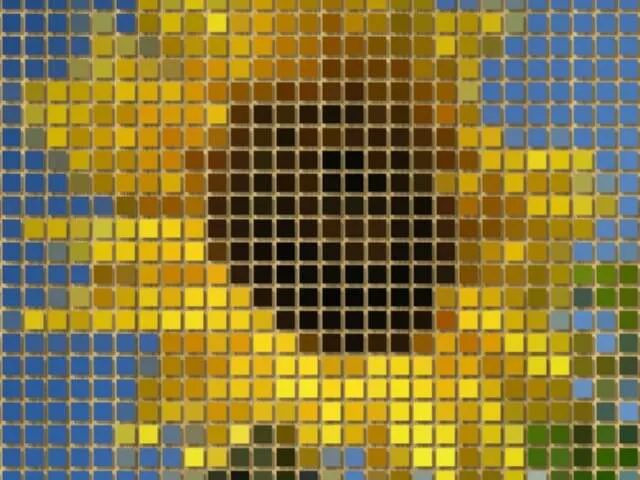
Pixel is a word that comes from combining "picture" and "element" - literally an image element. Think of a pixel as the smallest light point that makes up any digital image.
Each pixel can display a specific color based on the RGB system (Red, Green, Blue). These three primary colors combine at different intensities to create over 16 million different color variations.
The physical size of a pixel isn't fixed - it varies depending on resolution and screen size. A Full HD screen (1920x1080) has over 2 million pixels, while a 4K screen has over 8 million.
How Pixels Relate to Resolution
Screen or image resolution is measured in pixels. When we talk about a "1920x1080" image, we're saying it has 1920 pixels wide by 1080 pixels tall. It's like a giant grid where each position can display a different color.
For professionals working with high-resolution content, investing in quality hardware makes a significant difference. The MacBook series offers exceptional pixel density and color accuracy.

How Pixels Form the Images We See
Imagine you're creating a giant mosaic with millions of microscopic colored pieces. Each piece (pixel) has a specific position and determined color. When you look from far away, you see the complete image.
This is exactly how pixels work on your screens. Every electronic device has millions of pixels organized in a perfect grid. Each pixel receives instructions about what color to display at each moment.
The process happens so quickly that our eyes can't perceive the individual changes of each pixel. In a video, pixel colors change dozens of times per second, creating the illusion of movement.
The Importance of Pixel Density
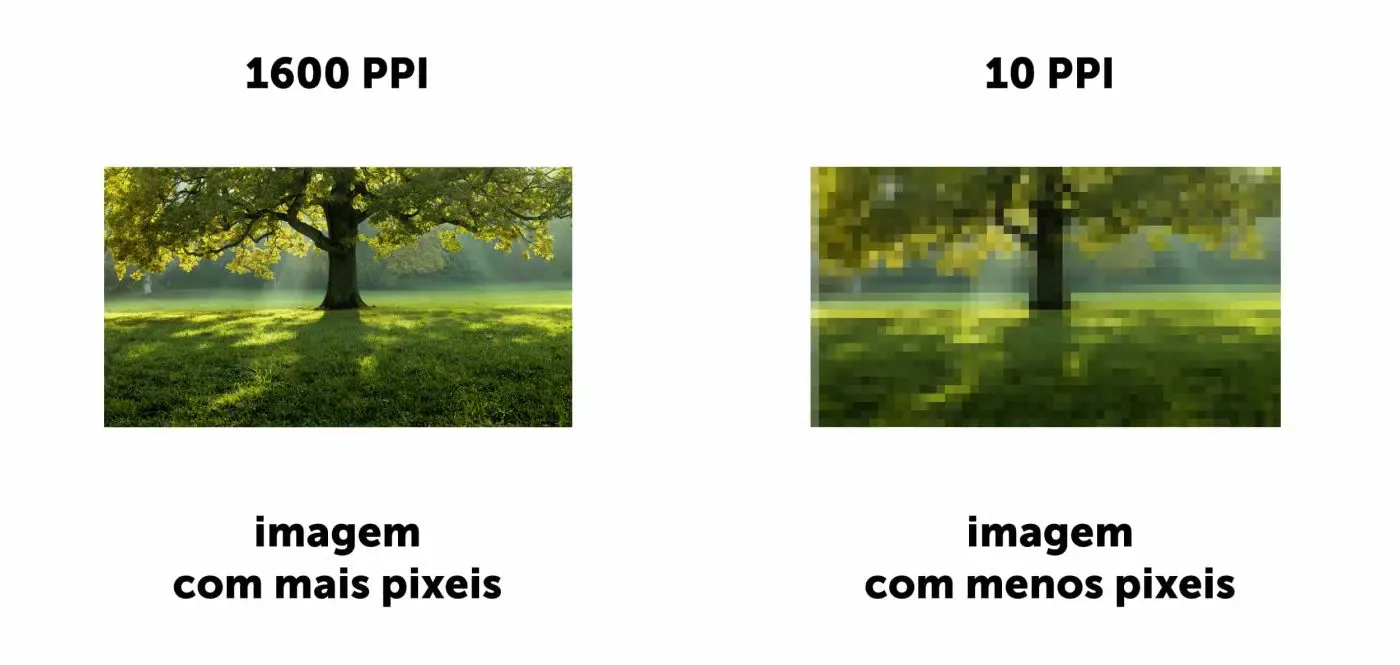
Pixel density, measured in PPI (Pixels Per Inch), determines how sharp an image appears. Screens with higher pixel density can display finer details and more readable text.
For gamers who want to experience every detail, high-refresh gaming monitors with excellent pixel density can transform your gaming experience.
What is Rendering - Transforming Data into Images
Rendering is the magical process that transforms a set of instructions and data into a visual image you can see on screen. It's like a universal translator that takes complex mathematical information and converts them into organized colored pixels.
Think of rendering like a chef who receives a detailed recipe and all necessary ingredients. The recipe contains precise instructions, and the final result is a delicious dish. In rendering, the "recipe" is the graphics data, and the "final dish" is the image on your screen.
Understanding this process becomes crucial when choosing equipment. Whether you're looking for computers optimized for professional work or exploring cutting-edge gadgets, the hardware directly impacts visual quality.
The Basic Rendering Process
The rendering process involves several complex steps that happen in fractions of a second. First, the system receives information about geometric shapes, object positions, light sources, and materials.
Then, it calculates how light interacts with each surface, what colors each pixel should have, and how to apply special effects like shadows and reflections.
Types of Rendering - Real-Time vs Pre-Rendering
There are two main types of rendering, each with specific characteristics and applications. Understanding the difference helps explain why some games run smoothly while others stutter.
Real-Time Rendering
Real-time rendering happens instantly while you're using the device. This is the type used in games, applications, and graphical interfaces. The system needs to generate images at the speed you interact with them.
To be considered real-time, rendering must process at least 15 frames per second (FPS), although most modern systems work with 30, 60, or even 120 FPS.
For those serious about gaming performance, investing in quality peripherals makes a huge difference. Mechanical keyboards provide needed responsiveness, while ergonomic mice ensure comfort during long sessions.
Pre-Rendering
Pre-rendering is used when visual quality is more important than speed. It's common in movies, animations, and architectural work. The system can take minutes, hours, or even days to create a single perfect image.
Studios like Pixar use entire server farms to pre-render their movies. A single scene can require hundreds of processing hours to achieve the level of realism we see in theaters.
The Role of GPUs in the Rendering Process
GPUs (Graphics Processing Units) are the true heroes of modern rendering. While CPUs are like experienced chefs who can make any dish but only one at a time, GPUs are like industrial kitchens with hundreds of cooks working simultaneously.
GPU architecture was designed specifically to perform thousands of simple operations at once - exactly the type of work needed to calculate the color of millions of pixels simultaneously.
The evolution of GPU technology has been remarkable. For those interested in learning more, the Code: The Hidden Language of Computer Hardware and Software book provides excellent insights into fundamental principles.
Why GPUs are Essential
The difference between using a CPU and GPU for rendering is like painting a wall with a fine brush versus using a paint roller. Both do the job, but one is much more efficient.
GPUs can process textures, apply lighting effects, and calculate geometric transformations dozens of times faster than CPUs. Modern GPUs come with specialized features like dedicated cores for ray tracing and artificial intelligence.

Advanced Rendering Techniques
The world of rendering is constantly evolving, with new techniques being developed to create increasingly realistic and impressive images. Let's explore some of the most important technologies revolutionizing visual content.
Ray Tracing - Simulating Real Light
Ray tracing is a revolutionary technique that simulates how light actually works in the physical world. Instead of using tricks and approximations, ray tracing virtually tracks each light ray from its source to the observer.
This technique produces perfect reflections, soft shadows, and extremely realistic lighting. The only problem is that it requires enormous computational power - which is why it has only recently become viable in real-time applications.
Understanding these concepts becomes easier with proper study materials. The How Computers Really Work book offers practical insights into how these complex rendering processes actually function.
Texture Mapping and Shading
Texture mapping is like applying wallpaper to virtual objects. A 2D texture is "pasted" onto a 3D shape, giving it the appearance of wood, metal, fabric, or any other material.
Shading then calculates how light interacts with that surface, creating the effect of depth and realism. These processes are fundamental to making virtual objects look real.
Anti-Aliasing - Eliminating the Jagged Effect
Anti-aliasing is a technique that smooths object edges, eliminating the "jagged" effect that can appear on diagonal lines and curves. It's like using a brush to blend colors at edges, creating smoother transitions.
Rendering in Different Areas
Rendering isn't used only in games and movies. This fundamental technology is present in various areas of our lives, each with its specific needs and challenges.
Gaming - Real-Time Rendering
In video games, rendering needs to be extremely fast and responsive. Every player movement needs to be reflected instantly on screen. Developers use various techniques to optimize performance.
Modern games also implement technologies like Nvidia's DLSS and AMD's FSR, which use artificial intelligence to improve image quality without sacrificing performance.
For gamers seeking the best experience, it's worth checking out the best mechanical keyboards for gamers and ergonomic gaming chairs to complete your setup.
Graphic Design and Architecture
In graphic design and architecture, visual quality is more important than speed. Professionals use pre-rendering to create photorealistic images of products that don't yet exist or buildings that will be constructed later.
These projects can take hours or days to render a single image, but the final result compensates for the time invested.
Cinema and Animation
The film industry uses the most advanced rendering techniques available. Movies like Avatar use rendering farms with thousands of computers working 24 hours a day to create the scenes we see in theaters.
A single scene can require billions of calculations and consume hundreds of processing hours. That's why producing movies with many visual effects can take years to complete.
Web Browsers
Even your web browser uses rendering! When you visit a website, the browser needs to interpret HTML, CSS, and JavaScript code, transforming them into the visual pages you see.
Common Problems - Pixelation and How to Avoid It
Pixelation is one of the most common problems related to pixels and rendering. It happens when individual pixels become visible in the image, creating a "blocky" effect that can harm visual quality.
What Causes Pixelation
Pixelation usually occurs when an image is enlarged beyond its original resolution. Imagine you have a small photo and try to enlarge it to poster size - there isn't enough information in the original image.
Another common cause is excessive compression of images or videos. To reduce file sizes, compression algorithms remove information, but when compression is too aggressive, this results in quality loss.
How to Avoid Pixelation
To avoid pixelation problems, always work with images at the highest possible resolution for your final use. If you're going to display something on a 4K screen, make sure the original content is also in adequate resolution.
When saving or exporting content, pay attention to quality settings. It's often worth having slightly larger files in exchange for better visual quality.
For those working with digital content professionally, investing in quality equipment makes a significant difference. Kindle devices with high-resolution screens are perfect for reading technical documentation.
The Future of Digital Rendering
The future of rendering is being shaped by emerging technologies that promise to further revolutionize our visual experience. Artificial Intelligence, quantum computing, and virtual reality are opening new possibilities.
Neural Rendering and AI
Neural rendering uses neural networks to accelerate the image creation process. Instead of calculating each pixel individually, AI can "learn" visual patterns and generate high-quality images much more quickly.
This approach is especially promising for real-time applications where speed is crucial. Imagine games that can generate entire worlds procedurally with cinematic quality.
For those interested in AI technologies, the AI Engineering Bible provides comprehensive insights into building and scaling AI systems, including those used in advanced rendering.
Virtual Reality and Metaverse
With the growth of virtual reality and metaverse concepts, the demand for high-quality real-time rendering has never been higher. These environments need to not only look real but also react instantly to user movements.
For those interested in exploring these technologies, it's worth understanding how IoT is transforming our homes and creating new integrated digital environments.
Quantum Computing
Quantum computing promises to solve some of the biggest challenges in current rendering. With the ability to process information fundamentally differently, quantum computers could perform complex calculations necessary for photorealistic real-time rendering.
Although still in early stages, this technology could completely revolutionize how we create and consume digital visual content in the coming years.
Frequently Asked Questions
What is a pixel?
A pixel is the smallest unit of a digital image, a light point that displays a specific color based on RGB (Red, Green, Blue) combinations. It's the fundamental building block of all digital images.
What is rendering in digital images?
Rendering is the process that transforms mathematical data and instructions into visual images you can see on your screen. It involves complex calculations to determine colors, lighting, and effects for each pixel.
What's the difference between real-time and pre-rendering?
Real-time rendering creates images instantly as you interact (like in games), processing at least 15-120 FPS. Pre-rendering can take hours or days for perfect quality (like in movies).
Why are GPUs important for rendering?
GPUs have thousands of cores working in parallel, making them much more efficient than CPUs for rendering calculations. They're specifically designed for the type of work rendering requires.
How to avoid pixelation in images?
Always work with high-resolution images, use quality formats like PNG or high-quality JPEG, avoid excessive compression, and ensure original content matches your display resolution.
What is ray tracing?
Ray tracing is a rendering technique that simulates how light actually works in the physical world, tracking each light ray to produce perfect reflections, shadows, and realistic lighting.
Can old computers handle modern rendering?
Older computers struggle with modern rendering demands, especially for games and real-time applications. Pre-rendering is possible but will take much longer on older hardware.
Conclusion
Understanding pixels and rendering helps us better appreciate the incredible technology we use every day. From the smartphone in your pocket to blockbuster movies in theaters, everything depends on these fundamental concepts. The journey of pixels represents one of the greatest achievements of modern engineering, where every image you see is the result of millions of precise calculations executed in fractions of a second.
As technology continues to evolve, we can expect even more realistic images, more immersive experiences, and new ways to interact with digital content. Whether you're a professional working with visual content, a gaming enthusiast, or simply curious about technology, understanding pixels and rendering opens up a deeper appreciation for our digital world. Every pixel tells a story, and every rendered frame represents countless calculations bringing our digital dreams to life.